|
Claus Aßmann
This distribution contains the source code for sendmail1.1 X which implements a message transfer system (MTS)1.2. It supports the Simple Mail Transfer Protocol (SMTP) as specified by RFC 2821 [Kle01] and various extensions, e.g., STARTTLS [Hof99], AUTH [Mye99], PIPELINING [Fre00], as well as other protocols, e.g., LMTP [Mye96].
sendmail X.0 is intended to be used as a secure and efficient mail gateway. It does not provide any mail content modification capabilities, e.g., masquerading of addresses or changing (addition, removal) of headers. Later versions will probably add such capabilities.
sendmail X is a modularized message transfer system consisting of five (or more) persistent processes, four of which are multi-threaded. A central queue manager (QMGR) controls SMTP servers (SMTPS) and SMTP clients (SMTPC) to receive and send e-mails, an address resolver (SMAR) provides lookups in various maps including DNS for mail routing, and a main control program (MCP) starts the others processes and watches over their execution. The queue manager organizes the flow of messages through the system and provides measures to avoid overloading the local or remote systems by implementing a central control instance.
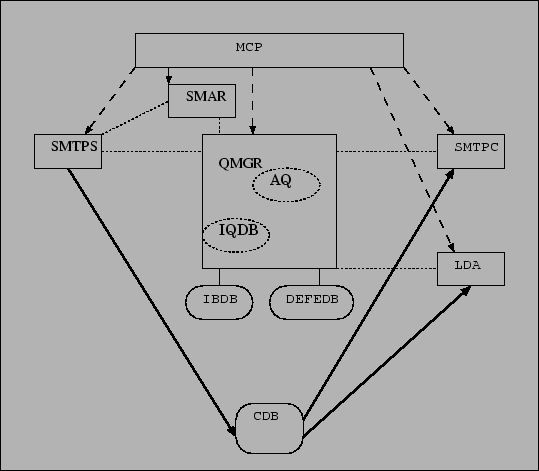
More information about each component will be given in the appropriate sections. Complete documentation and background information can be found in [Aßmb]. Section 7.1 describes the data flow in sendmail X, the following is a brief summary. Figure 1.1 shows the interaction of the various components and databases1.3. Incoming messages are accepted by an SMTP server (SMTPS) which stores the messages in the content database (CDB). The envelope information, i.e., sender and recipients, is stored by the queue manager in an incoming queue (IQDB) and written to disk to the incoming queue backup database (IBDB). For a delivery, the envelope information must be transferred into the active queue (AQ). The scheduler in QMGR takes recipient envelopes from AQ and creates transactions which are given to an SMTP client (SMTPC) for delivery. An SMTP client takes the transaction information and tries to send a message whose content is read from CDB. After a successful delivery attempt a record is written to IBDB that logs this information. The deferred envelope database (DEFEDB) is only used if a message cannot be delivered during the first attempt.
This version of sendmail X does not come with a local delivery agent nor a mail submission program. See Sections 4.3.1 and 4.2 which programs can be used to achieve the desired functionality.
The document ``Sendmail X: Requirements, Architecture, and Functional Specification'' [Aßmb] provides the background about the sendmail X design, its architecture, as well as the functional specification, and details about the implementation.
In this documentation, a command written as
$ command
should be executed as an unprivileged user. Only a command written as
# command
should be executed as the superuser.
If a command contains components that need to be replaced by values that depend on the environment or the local configuration, then it is usually written as a macro, e.g., $LOGFILE.
A number in parentheses behind a command or function refers to the manual section, e.g., syslog(3), as it is usual for Unix documents.
This document has been written for sendmail X.0.0.0.0, see also the greeting of the SMTP server and the version output of the main components. See Section 6.8 for information about version naming.
There are still some error conditions which may not be handled gracefully, i.e., in case of some resource problems (e.g., out of memory or out of disk space) the system may abort; however, this is common for most open source MTAs which simply abort if they are running out of memory. See Section 4.10.1 how to deal with those conditions. The software is running since 2004-01-01 as MTS on the main machine of the author without any significant problem, i.e., it never lost any mail.
Please report bugs and provide feedback either to the developers list[Aßma] (if you are subscribed) or directly to1.4:
< smx + feedback (at) sendmailx . org >
or in the usenet newsgroup comp.mail.sendmail.
Feedback about the code, the documentation (including typographical, syntactical, and grammatical errors, pointing out parts that are not well enough explained, etc.), as well as patches and enhancements are highly appreciated.
For those who do not want to read the entire documentation, it is adviced to read at least sections 2.2 and 2.4, and the appropriate section of Chapter 4.
The source code is distributed as a (compressed) tar file and is accompanied by a PGP signature file which has the same name as the tar file plus the ending .sig. To verify the integrity of the source code PGP [PGP] or GPG [Gnu] are required as well as the sendmail PGP signing keys [Sen]:
$ gpg -verify smX-$VERSION.tar.gz.sig
or:
$ pgp smX-$VERSION.tar.gz.sig smX-$VERSION.tar.gz
Further information, especially about warnings or possible errors, can be found in the documentation for PGP or GPG.
sendmail X uses a configure file generated by GNU autoconf for configuration. Hence you can build it (after verifying and unpacking the distribution) as follows:
$ mkdir obj.$OS && cd obj.$OS && $PATHTO/smX-$VERSION/configure $OPTIONS
Obviously you have to replace $OS and $VERSION as well as $PATHTO. It is also possible to build sendmail X in the source tree, however, this is discouraged:
$ ./configure && make && make check
Notes: do not run this as root; this is not just a basic security measure (only use a privileged account if it is really required), but most of the programs refuse to run with root privileges. It might be useful to save the output of these commands2.1for later inspection.
Beside the usual configure options like -prefix a few sendmail X specific configuration options are available:
Notes:
$ B=/usr/local/BerkeleyDB.4.3
$ $PATHTO/smX-$VERSION/configure --with-bdb-libdir=$B/lib \
  --with-bdb-incdir=$B/include
To get the current list of configuration options, use configure -help.
$ make check
will run all test programs; currently those tests take about eighty minutes to run on a standard workstation. For each of the test programs one line is printed to denote whether the test succeeded, i.e., the output consists of lines with the marker PASS: or FAIL: and the name of the test program program. Additional output might be generated by the test programs themselves, e.g.,
2 of 2 tests completed successfully,
or some debug output. The debug output may even indicate an error, but only a final FAIL: indicates a test failure. Some tests depend on compilation options and are only conditionally enabled; others may depend on environment variables, see 2.3.1. For disabled tests SKIP is shown.
Since some of the tests may fail (see Section 2.3.2) and make will usually stop after encountering an error, it might be required to use
$ make -i check >check.out 2>&1
to perform all tests.
Environment variables can be used to disable some test programs if required or change the behavior of some test programs. These environment variables and their effects are:
SM_NO_DNS_TEST:
disable tests that perform DNS lookups.
These lookups may use domains that are under control of the sendmail X author.
SM_DNS_TIMEOUT:
can be used to set a different timeout than the default,
however, it may not be obeyed by all DNS test programs.
SM_STOPONERROR:
causes most test scripts that perform multiple checks
to stop on the first error that occurs instead of performing all checks.
SM_NO_LOG_TEST:
disables some tests that use syslog(3).
SM_NO_SLOW_TEST:
disables some tests that take a very long time.
In this example the DNS timeout is set to 60 seconds and tests that take a very long time are disabled:
$ SM_DNS_TIMEOUT=60
$ SM_NO_SLOW_TEST=1
$ export SM_DNS_TIMEOUT SM_NO_SLOW_TEST
$ make -i check
10.1.2.3 myname myname.my.domainor
10.1.2.3 myname.my.domain myname
For more information about possible test program problems see Section 12.3.2. For problems with programs in the contrib/ directory, see contrib/README.
sendmail X needs several users to provide separation of privileges and to enhance security. Currently there are four required accounts (the numbers for uid and gid are examples only); the last one listed below (smx) is not really required:
smxs:*:260:260:Sendmail X SMTPS:/nonexistent:/sbin/nologin
smxq:*:261:261:Sendmail X QMGR:/nonexistent:/sbin/nologin
smxc:*:262:262:Sendmail X SMTPC:/nonexistent:/sbin/nologin
smxm:*:263:263:Sendmail X misc:/nonexistent:/sbin/nologin
smx:*:264:264:Sendmail X other:/nonexistent:/sbin/nologin
with the corresponding groups:
smxs:*:260:
smxq:*:261:
smxc:*:262:smxs
smxm:*:263:smxs,smxq
smx:*:264:
To check whether the required users and groups exist, run
$ ./misc/sm.check.sh -p
(in the build directory); see below how to override the default values for the user and group names.
A shell script to setup the directories, files, etc. as described below is available in misc/sm.setup.sh.in. This script is modified by configure to create misc/sm.setup.sh (in the build directory) which is invoked when
# make install
is called. Most defaults in the installation script misc/sm.setup.sh can be overridden with environment variables (default is listed in square brackets):
Important Notes:
make install (i.e., misc/sm.setup.sh) will create all the required directories and files with the correct permissions provided the users and groups have been set up properly. This section shows explains what the created structure looks like.
The CDB directories (0-9, A-F) must be owned by smxs and have group smxq with the permissions 0771:
drwxrwx--x 2 smxs smxq 0/
Note: this means that everyone with access to the machine can guess the name of content files (see Section 10.1 for the format; the names can also be read from the logfiles if those are world-readable) and list (ls(1)) them, however, they cannot access the content files as those are owned by smxs with mode 0640 and group smxc, e.g.,
-rw-r----- 1 smxs smxc 1993 Jul 9 21:19 2/S000000000006B1D200
The main (DEFEDB) and incoming queues (IBDB) must belong to smxq and should not accessible by anyone else:
drwx------  2 smxq  smxq        defedb/
drwx------  2 smxq  smxq        ibdb/
drwx------  2 smxq  smxq        ibdb/ibdb/
Mailertable, aliases map, and other maps for SMAR (see Section 3.9.3) should belong to smxm and can be readable as local conventions require:
-rw-r--r--  1 smxm  smxm         mt
-rw-r--r--  1 smxm  smxm         aliases.db
In general, maps should be owned by the user id of the program that uses them, e.g., smxq owns the QMGR configuration map qmgr_conf.db (see Section 3.8.1).
The sendmail X configuration file can either belong to root or the generic sendmail X user:
-rw-r--r-- 1 smx smx smx.conf
The directories in which the communication sockets between QMGR and the other programs are located must belong to smxq and be group accessible for the corresponding program:
drwxrws---  2 smxq  smxm        qmsmar/
drwxrws---  2 smxq  smxc        qmsmtpc/
drwxrws---  2 smxq  smxs        qmsmtps/
The directory in which the communication socket between MCP and SMTPS is located must belong to smxs:
drwxr-x--- 2 smxs smxs smtps/
The logfiles must be owned by the corresponding user and may have relaxed group (or even world) read permissions:
-rw-r-----  1 smxq  operator   qmgr.log
-rw-r-----  1 smxm  operator   smar.log
-rw-r-----  1 smxc  operator   smtpc.log
-rw-r-----  1 smxs  operator   smtps.log
To check whether an installation was successful, run
# ./misc/sm.check.sh -P
(in the build directory).
Configuration of sendmail X can be done via command line parameters or via a configuration file (the latter is preferred, the former offers only a small subset of the available configuration options). If a configuration file and command line options are specified, then the options are currently processed in order, i.e., later settings override earlier ones for the same options. Information about the former is available by invoking a program with the option -h (MCP currently uses syslog(3) instead of stderr), it will show the usage as well as the default values. The syntax of the configuration files is specified in the following sections. To actually use a configuration file, the option -f $CONFIGFILE must be used, otherwise the programs use only the built-in default values, but not a configuration file. Option '-V' can be used to show version information, specifying '-V' multiple times shows more detail, e.g., '-VVVVV' will show the configuration data including the default value for (almost) every option, and '-VVVVVV' will also show all available flags.
Some configuration options can be set via Berkeley DB hash maps, these maps are: qmgr_conf for QMGR (see Section 3.8.1) and access for SMTPS (indirectly via the address resolver, see Section 3.9.3).
The grammar for a sendmail X configuration file is very simple:
| conf | ::= | entries |
| entries | ::= | entry * |
| entry | ::= | option  section section |
| section | ::= | keyword [name ] "{" entries "}" [";"] |
| option | ::= | option-name "=" rhs |
| rhs | ::= | value ";" "{" value-list "}" [";"] |
A configuration file consists of entries, each entry is either an option or a section. An option has a name, an equal sign, and a value terminated by a semicolon or a (bracketed) list of values separated by comma. A section consists of a keyword, an optional name, and a (bracketed) sequence of entries. Keywords and options are not case sensitive. The layout of a configuration file does not matter, i.e., indentation and line breaks are irrelevant (in general, but see below for strings).
Values in a configuration file are usually strings or numbers. If a string is used, then it should be quoted, unless it contains no special characters which are treated specially by the grammar. If a string is very long it can be broken into substrings spread out over several lines (just like strings in ANSI C), e.g.,
  somemessage = "this is a very long string which is spread "
     "out over several lines because otherwise it is too "
     "hard too read.";
Numeric values can have the usual prefixes (known from the programming language C) of 0x for hexadecimal (with digits 0 to 9, A to F, and a to f) and 0 for octal (with digits 0 to 7). Valid boolean values are 0, false, off for false, and 1, true, on for true (case insensitive).
In some cases it is possible to have units for values. Currently time and size values make use of this feature. Valid time units are w for weeks, d for days, h for hours, m for minutes, and s for seconds. Valid units for size are B for bytes, KB for kilo bytes, MB for mega bytes, and GB for giga bytes. It is allowed to specify a sequence of numbers and units, e.g., 1h 5m 12s. Unless otherwise specified, the default units for times and sizes in a configuration file are s and B, respectively; for those values these units can be used.
The installation script creates the file smx.conf in the configuration directory (/etc/smx, see Section 2.4). Check the comments in the file and edit it if required. A configuration file for sendmail X contains several sections: a global section which specifies the locations of sockets and directories that are used by multiple components, and one section each for QMGR, SMAR, SMTP server, and SMTP client. Other sections may define services that are started by MCP, e.g., a local mailer.
CDB_base_directory = "/var/spool/smx/";

qmgr {
  AQ_max_entries = 8192;
  smtpc { initial_connections = 19; max_connections = 101; }
  smtps { max_connections = 5; max_connection_rate=160; }
  max_errors_per_DSN=16;
  wait_for_server = 4; wait_for_client = 4;
  start_action = wait; user = smxq;
  restart_dependencies = { smtps, smtpc, smar };
  path = "/usr/libexec/qmgr"; arguments = "qmgr -f /etc/smx/smx.conf";
}

smtps { flags = {8bitmime}; CDB_gid = 261; IO_timeout = 5m3s;
  listen_socket { type = inet; port = 25; }
  start_action = pass; pass_fd_socket = smtps/smtpsfd;
  user = smxs; path = /usr/libexec/smtps;
  arguments = "smtps -f /etc/smx/smx.conf"; }

smtpc {
  Log_Level = 12; IO_timeout = 6m; wait_for_server = 4;
  start_action = wait; user = smxc; path = "/usr/libexec/smtpc";
  arguments = "smtpc -f /etc/smx/smx.conf"; }

smar {
  Log_Level = 12;
  nameserver = {10.10.10.9, 127.0.0.1};
  DNS_timeout = 6;
  start_action = wait; user = smxm; restart_dependencies = { smtps, qmgr };
  path = "/usr/libexec/smar"; arguments = "smar -f /etc/smx/smx.conf";
}
All of the following options have defaults and should only be changed if necessary.
hostname:
set the hostname to use for the various components.
This can be set if gethostbyname(3) does not return
a valid (fully qualified) hostname (format: string).
CDB_base_directory:
base directory of CDB (format: string);
this should either be empty (which is the default)
or a path to a directory including a trailing slash;
the CDB library currently simply appends the directory names
(see Section 2.4.1)
to it.
It might be useful to move some subdirectories to different disks
(by creating (symbolic) links (ln(1)))
to spread the I/O load.
SMAR_socket:
socket created by the address resolver over which clients
(SMTPS, QMGR) can send requests (format: string).
SMTPC_socket:
communication socket between SMTPC and QMGR (format: string).
SMTPS_socket:
communication socket between SMTPS and QMGR (format: string).
The sockets are currently Unix domain sockets only, hence the value is simply the pathname of the socket.
There is currently one configuration option which is the same across all modules but is not specified in the global section because it is specific to the individual modules.
log:
this is a section with the following options:
facility:
see syslog(3)
for valid facilities, here are some valid options provided the OS offers them:
daemon, mail, auth, local0, etc.
ident:
identification string for openlog(3), defaults to name of the modules.
It might be useful to chose other identifiers, e.g., smXmta
or smxQMGR.
options:
options for openlog(3) (without the leading LOG_)
as provided by the OS, e.g.,
pid or ndelay.
Example:
qmgr { log { facility = daemon; ident=smX-qmgr; } }
smtps { log { facility = mail; ident=smX-MTA; } }
Note: debug output is currently sent to stdout; syslog(3) is not used for debugging.
All modules have an option to set the amount of logging
(log_level) that should be done.
The larger the value the more information is logged.
For normal operation a value of 9 is recommended.
During testing values of 12 to 14 are useful.
Most names of files (including maps) and directories in the configuration file have a default name (compiled into the binary) without an absolute path, e.g., aliases.db. If a pathname is not explicitly set in the configuration file or does not use a absolute path (i.e., begins with a slash), then the default is relative to either
cert_file.
The paths for files mentioned in case 1 are taken relative to the path of the configuration file which is passed via the -f option to the various modules. For example: if SMAR is started as
/usr/libexec/smar -f /etc/smx/smx.conf
then the pathname used for the aliases map is /etc/smx/aliases.db. This applies to the SMAR maps aliases, mailertable, and access (3.9.2), the QMGR qmgr_conf map (3.8.1), and the STARTTLS related files and directories used by the SMTP server (3.10) and client (3.11).
The paths for files mentioned in case 2 are taken relative to the execution directory. All sendmail X modules should be started (via MCP) in the main queue directory (default: /var/spool/smx, see Section 2.4).
See the various configuration options explained below how to override the defaults. Note: relative pathnames specified in the configuration file are (currently) always relative to the main queue directory.
Every section in a sendmail X configuration file that refers to one of its four main components (QMGR, SMTPS, SMTPC, and SMAR; see Section 1.1.1) has some options that are relevant for MCP. These MCP options are:
start_action:
one of nostartaccept, accept, pass, wait
(required).
listen_socket:
this is a subsection that specifies the socket on which
a process should listen.
It must be specified for any
start_action except wait.
There are two different socket types available:
type = inet
port:
port number on which process should listen (format: numeric).
address:
IP address on which process should listen,
if none is specified the process listens on all local (IPv4) addresses
(format: IPv4 address).
type = unix
pass_fd_socket:
pathname of Unix Domain socket to pass a file descriptor to the process.
user:
user name to run process.
group:
group name to run process.
restart_dependencies:
list of other sendmail X components
that need to be restarted when this one is restarted
(or crashes).
path:
path to program to execute
(required).
arguments:
arguments (argv), must start with name of program, see execv(2)
(required).
pass_id:
option to use to pass a unique, numeric identifier to the spawned
process via the command line.
The option will be inserted as first argument.
Example:
smtpc { pass_id = "-i"; min_processes = 4; max_processes = 4;
  path = /usr/libexec/smtpc; arguments = "smtpc -f smx.conf"; }
will cause MCP to start four smtpc processes, each with the options
-i  -f smx.conf
where is replaced with a unique identifier.
-f smx.conf
where is replaced with a unique identifier.
Notes about start_action:
start_action = pass
the option
pass_fd_socket must be specified;
in this case MCP binds to the specified socket (listen_socket)
and passes it via the Unix domain socket
(pass_fd_socket)
to the started process.
start_action = nostartaccept MCP waits for incoming connections,
and then starts a process to handle a single connection.
start_action = accept MCP binds to the socket
and then starts a process to handle the connections
without waiting for an actual request.
start_action = wait MCP simply starts the requested number of
processes without passing them any open connections.
This is intended for processes that do not communicate
with external clients.
MCP is currently a generic control program that does not have any builtin knowledge about the various sendmail X modules. Hence the MCP options for each sendmail X component must be specified properly, there are no builtin defaults that could be associated with the functionality of the various sendmail X modules. The default configuration file created by the installation program contains the correct defaults. These should only be changed if really necessary.
The following configuration options are valid for QMGR:
AQ_max_entries:
maximum number of entries in AQ (active queue)
(unit: entries).
Note: this value must be larger than the largest number of recipients
accepted by a single transaction.
conf:
name of configuration map (including extension), see
Section 3.8.1 for details.
See also Section 3.6 about relative pathnames.
control_socket:
specify pathname of ``control'' socket (for querying and
making requests).
This socket can be used by the query/control program
qmgrctl, see Section
4.6.3.
DEFEDB:
base_directory:
home directory for DEFEDB.
log_directory:
log directory for DEFEDB.
For better performance, this directory can be set to point to a different
disk than the base directory of DEFEDB.
DSN_handling:
merge_delay_max:
maximum time to wait for merging multiple DSNs into one
(unit: s).
flags:
configuration flags:
header_only:
include only the headers in a DSN;
by default the first bounce includes the entire message
and subsequent ones include only the headers.
MIME_Format:
use MIME to structure a DSN.
Note: this is not (yet) a DSN in the format specified by RFC 3464
[MV03].
max_errors_per_DSN:
maximum number of error messages (failed recipients) in a bounce (DSN)
(unit: entries).
IBDB:
max_commit_delay:
maximum time between commits to IBDB
(unit:  s)
s)
size:
maximum size of each IBDB file
(unit: B).
max_open_TAs:
maximum number of open transactions in IBDB before a commit is performed
(unit: entries).
Note: the configuration file offers no way to specify a base directory for IBDB, however, the directory can be easily moved elsewhere and a (symbolic) link (ln(1)) can be added.
IQDB:
max_cache_entries:
maximum number of entries in IQDB cache
(unit: entries).
This must be larger than the sum of all recipients in open transactions.
hash_table_entries:
size of hash table for IQDB
(unit: entries).
This must be larger than max_cache_entries.
log_level:
logging level.
min_disk_space:
minimum amount of free disk space
(unit: KB).
This value should be significantly larger than the maximum size of
a message to be accepted by the SMTP server,
it should be as large as the maximum message size multiplied by
the maximum number of incoming connections.
OCC_max_entries:
size of outgoing (SMTPC) connection cache
(unit: entries).
This should be large enough to keep track of outgoing connections
over a time span that is at least as long as the maximum retry time.
ok_disk_space:
amount of free disk space at which normal operation continues
(unit: KB).
Must be larger than
min_disk_space.
queue_return_timeout:
maximum time in queue
(unit: s).
queue_delay_timeout:
send delay warning (``delayed DSN'')
if the mail is still in the queue
after at least this duration
(unit: s).
To turn off delayed DSNs set this to a value bigger than
queue_return_timeout.
Note: based on the retry schedule the delayed DSN might be sent
later than the option specifies.
retry_max_delay:
maximum time for retrying a delivery
(unit: s).
retry_min_delay:
minimum time for retrying a delivery
(unit: s).
smtpc:
initial_connections:
maximum initial number of outgoing connections to a single host
(unit: entries).
The sliding window for the slow start algorithm (see Section
3.8.1)
is initialized with this value.
max_connections:
maximum number of outgoing connections to a single host
(unit: entries).
lmtp_max_rcpts_per_transaction:
maximum number of recipients per transaction for mail sent via LMTP
(unit: entries).
smtp_max_rcpts_per_transaction:
maximum number of recipients per transaction for mail sent via (E)SMTP
(unit: entries).
smtps:
max_connection_rate:
maximum incoming connection rate from a single host
(unit: connections/60s).
max_connections:
maximum number of open incoming connection from a single host
(unit: entries).
wait_for_client:
maximum amount of time to wait for a client to become available
(unit: s)
wait_for_server:
maximum amount of time to wait for a server to become available
(unit: s)
QMGR implements a ``slow start'' algorithm to control the number of concurrent connections to one IP address. Initially, it will at most create a (small) number of open connections up to a specified initial limit. For each successful delivery, the allowed number is increased up to specified maximum limit.
For incoming connections, QMGR establishes two limits: the connection rate and the number of open connections.
The Berkeley DB hash map qmgr_conf.db (the file should be owned by smxq) can have the following entries:
oci:, ocm:, icr:, and icm: take an IP address/net as parameter such that the limits can be imposed per IP address/net. For example:
oci:127.0.0.1      5
ocm:127.0.0.1     10
oci:10            10
ocm:10            50
oci:               1
ocm:               4
icr:10             5
icr:127.0.0.1    100
icm:127.0.0.1    120
Note, however, that the limits apply only to single IP addresses, they are not aggregated for nets. That is, for the example every single host in the IP net 10.x.y.z can have a maximum incoming connection rate of 5 messages per minute.
The default values for these configuration options are set in the binary and can be changed via command line options or the configuration file (see Section 3.8):
In general, maps must be declared before they can get used. Each map declaration in a configuration file is a named subsection - the name is used for later references - map in the smar section with the following options:
type:
type of the map; currently one of
hash (Berkeley DB hash),
sequence,
socket,
and
passwd.
file:
the filename of
the db file (including the extension)
(for type hash).
mapname:
name of the map used in the protocol
(type socket only).
address:
IPv4 address of inet socket.
(type socket only).
path:
the pathname of the Unix domain socket
(for type socket).
port:
port for inet socket
(type socket only).
maps:
list of map names to use in the map
(type sequence only).
Note:
for socket maps either
a Unix domain socket (path)
or an inet socket (address and port)
must be specified.
Example:
map localusers { type = hash; file = "/etc/smx/localusr.db"; }
map otherusers { type = hash; file = "/etc/smx/otherusr.db"; }
map password { type = passwd; }
map seq1 { type = sequence; maps = { localusers, otherusers }; }
map seq2 { type = sequence; maps = { password, otherusers }; }
The following configuration options are valid for SMAR:
access_map:
this is a subsection that specifies the access control map,
currently it has only one valid entry:
file:
filename of access map (including extension)
[default: access.db].
See Section 3.9.3 for details.
address_delimiter:
delimiter (one character) for address extensions in local part,
[default: '+'].
aliases:
this is a subsection that specifies the parameters for aliases:
file:
filename of aliases map (including extension)
[default: aliases.db].
flags:
localpart:
the aliases map contains only localparts of addresses
and those are only looked up for local addresses.
local_domains:
the aliases map contains fully qualified addresses
which are only looked up for local addresses.
This can be used similar to virtual users in sendmail 8, e.g.,| vuser1@virt1.tld: | user1 |
| vuser2@virt1.tld: | user2 |
| vuser3@virt2.tld: | user3 |
all_domains:
the aliases map contains fully qualified addresses
which are only looked up for any domain.
implicitly_match_detail:
the items are looked up according to the algorithm
specified in Section 3.12.1.
and additionally
+detail is implicitly matched when the pattern is
``user@hostname''.
That is, it overrides the default matching explained in case
1e
in Section
3.12.1.
replace_macros:
replace macros in the RHS of the map entries by the appropriate value,
see Section
3.12.3.
preserve_domain:
if the RHS of an entry is an unqualified address, do not append
the local hostname to it but the domain of the original address,
i.e., preserve the original domain.
dnsbl:
specify a DNS based blacklist3.1.
This section can be specified multiple times3.2;
it has the following required options:
domain:
specify the domain to use for DNS lookups, e.g.,
dnsbl.tld.
tag:
specify the tag to use for lookups in the access map
(which must be enabled, see
Section 3.10,
3h).
domain querying for an A record.
If an A record W.X.Y.Z is found, then it is looked up in
the access map as
tag:W.X.Y.Z.
for temporary and permanent DNS lookup failures the entries that will
be checked in the access map are
tag:temp and
tag:perm, respectively.
Notes:
tag,
this may be removed in later versions to allow for more flexibility;
e.g., the configuration option itself can include a delimiter.
smar { dnsbl { domain = dnsbl.tld; tag = dnsbltld; } }
access map:
dnsbltld:127.0.0.1  error:550 5.7.1 listed at dnsbl.tld as open relay
dnsbltld:127.0.0.2  error:550 5.7.1 listed at dnsbl.tld as spam source
dnsbltld:127.0.0.9  error:451 4.7.1 listed at dnsbl.tld as suspicious
dnsbltld:temp       error:451 4.7.1 temporary lookup failure at dnsbl.tld
If multiple DNS based blacklists are specified, the DNS queries are made concurrently but the lookups in the access map are performed in the order in which the blacklists are given; the first successful lookup is used as result, no further priorization is performed.
DNS_timeout:
timeout for DNS requests
(unit: s).
greylisting:
specify greylisting options,
see Section 3.9.4 for details.
grey_wait:
how long before greylisted can be confirmed.
grey_expire:
timeout for greylisted entries (did not confirm within that time).
white_expire:
expire whitelisted entries after this time if necessary.
white_timeout:
force whitelisted entries to reconfirm after this time.
main_DB_name:
name of main database (including .db extension).
secondary_DB_name:
name of secondary database (including .db extension).
expire_limit:
try to expire entries when this limit is reached.
netmask:
by default the entire IPv4 address is used as a key,
however, by specifying a netmask, e.g., 0xFFFFFF00,
the least significant bits can be cut off.
This can be used to deal with server farms, see Section
3.9.4,
e.g., if those are in the same class C subnet.
local_user_map:
this is a subsection that specifies a map of valid local addresses.
name:
Name of the map of valid local addresses;
the map must have been declared as explained in
Section 3.9.1.
flags:
log_level:
logging level.
mailertable:
this is a subsection that specifies a mailertable,
currently you can specify exactly one of the following two options:
file:
filename of mailertable
[default: mt].
In this case a plain text file is read during startup
and placed in an internal hash table. name:
name of a mailertable map that has been declared before
(see Section 3.9.1).
nameserver:
list of up to four IPv4
addresses3.3of nameservers.
SMAR requires a mailertable, and it can make use of an alias map as well as an access map, all of which are described in the subsequent sections.
To activate the access map
the flag access
(see Section 3.10,
item 3h)
(or the option -a)
must be given to the SMTP servers.
All entries consist of a left hand side (LHS, key)
which in turn has a tag and a (partial) address
and a right hand side (RHS, value).
Valid tags are:
| Tag | refers to |
| from: | envelope sender address (MAIL) |
| to: | envelope recipient address (RCPT) |
| cltaddr: | client IPv4 address |
| cltname: | client host name |
| cltresolve: | result of forward and reverse client lookup |
| mxbadip: | IPv4 addresses that are not allowed for MX - A records |
| certissuer: | DN of CA cert that signed that presented cert |
| certsubject: | DN of presented cert |
| protectedrcpt: | restrictions for recipient address (see Section 3.10.2) |
Valid addresses for from: and to: are RFC 2821 addresses without the angle backets (localpart@domain) as well as partial addresses in the form localpart and @domain, i.e., domains must be preceeded with an at (@) sign. Valid addresses for cltaddr: and mxbadip: are IPv4 addresses and (sub)nets, and for cltname: host names. The client host name is determined by performing a reverse lookup (PTR record) for its IP address. The resulting names are looked up as A records. Only if one of the A records matches the client IP address, the host name is set. The result of these lookups can be used for cltresolve: where the following keys are valid:
| ok | reverse and forward lookup match |
| no | reverse and forward lookup do not match |
| tempptr | reverse lookup (PTR) caused a temporary error |
| tempa | forward lookup (A) caused a temporary error |
| relay | allow relaying; currently only for to:, cltaddr:, |
| cltname:, certissuer:, and certsubject: | |
| ok | accept command |
| error:XYZ A.B.C.D text | return an error consisting of SMTP reply code XYZ, |
| enhanced status code A.B.C.D, and text, | |
| i.e., the part after error: is returned to the client. | |
| reject | same as error:550 5.7.0 Rejected. |
| discard | accept command but silently discard its effects. |
| cont | stop current check (e.g., map lookup), but continue others. |
Some tags may allow for other RHS values, these are explained when those tags are discussed in more detail.
Optionally a RHS can be preceeded by the modifier quick:. For an error: entry it causes an immediate rejection when the entry matches. Otherwise rejections can be delayed to the RCPT stage - if SMTPS is configured appropriately, see Section 3.10, item 3b - and can be overridden using the modifier quick: together with ok or relay in the access map for the recipient address with the to: tag. Using the modifier quick: together with relay for an entry with the cltaddr: tag causes it to override all other access map checks. quick:ok for an entry with the cltaddr: tag causes it to override other access map checks unless they are necessary to allow relaying.
Domain names (@domain) must have an exact match, subdomain matching can be specified with a leading dot, i.e., @.domain, see Section 3.12.1.
Examples:
| cltresolve:tempptr | error:451 4.7.1 reverse lookup failed |
| mxbadip:127.0.0.1 | error:551 5.7.1 Bad IP address 127.0.0.1 in MX/A list |
| mxbadip:192.168.255.255 | error:551 5.7.1 Bad IP address 192.168.255.255 in MX/A list |
| from:@spammer.domain | error:551 5.7.1 No spammers |
| from:@.spammer.domain | error:551 5.7.1 No spammers in subdomains either |
| to:root | error:551 5.7.1 No mail to root |
| to:abuse | quick:ok |
| cltaddr:10 | error:551 5.7.1 No direct mail from 10.x.y.z |
| cltname:spammer.domain | quick:error:551 5.7.1 No mail from spammers |
| to:@primary.domain | relay |
| cltaddr:10 | relay |
| cltaddr:127.0.0.1 | quick:relay |
The effect of discard depends on the protocol stage in which it is returned. If it is returned for a session, e.g., when a client connects, all transactions in the session are discarded. If it is returned for MAIL only that transaction is discarded. If it is returned for RCPT only that recipient is discarded; however, if no valid recipients are left, the entire transaction is discarded. Moreover, if quick:discard is returned for one recipient the entire transaction is discarded too.
The address resolver implements an asynchronous DNS resolver and by default it uses a file called mt (mailertable) (see Section 3.9.2, item 9) which consists of domain parts of e-mail addresses and corresponding IP addresses (in square brackets) or domain/host names. An entry consists (as usual in a map) of a LHS and a RHS; in the case of a flat text file, i.e., case 9a of Section 3.9.2, those are separated by one or more whitespace characters.
| LHS | ::= | [ "." ] hostname "." |
| RHS | ::= | [[ port "^" ] ["esmtp:"] hostlist
"lmtp:"
port "^"lmtp:" hostlist |
| port | ::= | integer |
| hostlist | ::= | host [ " " hostlist ] |
| host | ::= | "[" IPv4-address "]" hostname |
The key (LHS) is a hostname or a dot (denoting the default entry), the value (RHS) consists of an optional port number, an optional (esmtp) mailer and a list of hosts which are separated by spaces. If LMTP should be used, then the lmtp mailer must be selected. There are two cases: just lmtp: by itself means the delivery agent will use the Unix domain socket specified in the configuration file (see Section 3.11, item 2), if an inet socket should be used then a port and a host must be specified. A host is either a hostname (which is subject to MX lookups) or an IPv4 address in square brackets.
Example:
| localhost | lmtp: |
| SPAM.FILTER.DOMAIN | 2525^esmtp:[127.0.0.1] |
| LMTPHOST.MY.DOMAIN | 525^lmtp:[10.11.12.13] |
| MY.DOMAIN | esmtp:[10.1.2.3] |
| ANOTHER.DOMAIN | esmtp:MTA.SERVER |
| .TLD | esmtp:GATE.WAY |
| . | esmtp:SMART.HOST |
Note: currently this file must exist, even if there are no entries (it is created during installation).
To specify aliases for local addresses the Berkeley DB hash map aliases.db (Section 3.9.2, item 3a) is used. The key in the map must be
flags of the aliases option
(see Section 3.9.2,
3b).
The value (RHS) for an alias entry is a list of one or more
RFC 2821 addresses (including the angle brackets) separated by
spaces (not commas).
If the RHS has only a single address which does not have an '@' sign,
then it is converted into an RFC 2821 address by SMAR,
i.e., SMAR will append the hostname
of the machine and put angle brackets around the string.
Example:
| myalias: localuser |
| mylist: <user1@my.dom> <user2@my.dom> <localuser@local.host> |
| owner-mylist: someuser |
For mailing lists, the owner- notation is supported, i.e., if there are aliases list and owner-list then mail sent to list will use owner-list as envelope sender address; the original domain will be preserved.
Example for the flag
local_domains (see
3.9.2,
3(b)ii).
Let two domains be local, i.e., in mailertable:
| first.dom | lmtp: |
| second.dom | lmtp: |
and these entries be in aliases:
| myalias@first.dom: user1 |
| another@second.dom: user2 |
Then mail to <myalias@second.dom> and <another@first.dom> would be rejected while mail to <myalias@first.dom> or <another@second.dom> would be accepted.
Aliases can be nested (currently up to 5 levels, see smar/rcpts.c).
sendmail X supports a very simple form of greylisting
[Hara] which only uses the client IP address as key
[Posa] instead of a tuple consisting of
client IP address, envelope sender, and envelope recipient.
The idea behind greylisting is simple:
do not accept mail from an unknown source on the first connection,
but reject it with a temporary error.
Any MTA that conforms to RFC 2821 [Kle01]
will try to send the mail later on,
however, spamming systems often do not do that.
An IP address can be in three different states:
unknown: the client has not connected before or the entry is expired
from the database,
greylisted: the client has connected before but it did not yet
connect again within the configured time interval,
whitelisted: the client has connected before and it connected
again within the configured time interval.
The time interval is specified by its lower limit
grey_wait
and its upper limit
grey_expire.
A lower limit is used to prevent system from getting accepted
that just send a single message within a few seconds again and again.
The upper limit is used to avoid filling up the database.
If an entry has made it to the whitelisted state,
it will stay there for (at least) up to the timeout specified
by white_expire.
The greylisting algorithm implemented in sendmail X uses another
timeout white_timeout after which a
whitelisted entry is considered stale and must go through
the greylisting stages again, i.e., it is considered to be in state
unknown.
Each time a mail is sent from a whitelisted host,
the entry is updated,
to avoid that systems which regularly sent mail become greylisted again.
Greylisting is performed at the RCPT stage of the SMTP dialogue.
It is only done when a valid recipient is specified,
i.e., all other checks must have been successful.
Hence clients that do not try to send mail
or just try invalid recipient addresses
will not be added to the greylisting database.
If a transaction is subject to greylisting then the session
is aborted with an 421 error.
If a server uses callbacks to verify the sender address, then the option
delay_greylisting_error_until_DATA
(see Section
3.10,
item
3c)
is useful to avoid unnecessary delays.
Here is an example:
host A is the main MX server for domain example.com
and it uses greylisting,
host B is the main MX server for domain example.net and it
uses sender callbacks.
If a mail is sent to host B for
<rcpt@example.net>
with the sender address
<user@example.com>
then host B will connect to host A to test whether
<user@example.com> is a valid recipient.
However, if host A does not have host B in its whitelist, it will
return a 421 error after the
RCPT To:<user@example.com>
command, which
(depending on the implementation of the sender callback)
will cause host B to temporarily reject the mail for
<rcpt@example.net>.
By specifying the option
delay_greylisting_error_until_DATA
on host A the RCPT command will succeed and the original mail to
<rcpt@example.net>
will go through without delay.
The greylisting implementation uses two persistent databases
(specified by
main_DB_name and secondary_DB_name),
where the second DB is just a secondary index (by expiration time)
for the main DB.
These databases should be on a filesystem with sufficient free disk space
depending on how many connections from different clients the MTA receives.
Entries are only removed from the DB if there are more than
expire_limit
elements.
However, if none of the entries are expired yet,
then the number of elements can exceed that limit.
Greylisting can be disabled for selected hosts by adding them to the access map (see Section 3.9.3), e.g.,
| cltaddr:10 | relay |
| cltaddr:127.0.0.1 | quick:relay |
Some legitimate mailers do not behave properly and will not retry a mail that had a temporary error. This can cause mail loss in various situations, e.g., because the receiving system is currently out of some resources. However, to minimize the impact of greylisting on these misbehaving mailers it might be useful to explicitly whitelist them as:
| cltaddr:12.107.209.244 | ok |
| cltaddr:64.12.137 | ok |
A list of such broken mailers can be found at http://cvs.puremagic.com/viewcvs/greylisting/schema/whitelist_ip.txt [Harb]. A related problem are server farms where a mail might be resent from a different IP address. These should probably be whitelisted too; some of these can be found at the URL given before. However, entries in that file which have the comment ``unique sender per attempt'' do not need to be whitelisted as this implementation does not use the sender address.
Note: if a client authenticates via STARTTLS or AUTH such that relaying is allowed then greylisting is disabled for that client.
The following configuration options are valid for SMTPS:
auth:
this is a subsection that specifies the parameters for AUTH support.
It is only available if the system has been configured with the option
-enable-SASL, see Section
2.2.1.
flags:
flags for SMTP AUTH
See the Cyrus SASL documentation for the meaning of these flags: noplaintext, noactive, nodictionary, forward_secrecy, noanonymous, pass_credentials, mutual_auth.
trusted_mechs:
list of SASL mechanisms for which relaying is allowed if a client
successfully authenticated using one of those
Note: the name for the Cyrus-SASL configuration file is currently sendmail.conf (note the lower case 's' compared to the name for the sendmail 8 Cyrus-SASL configuration file). That file can be used to adjust the list of mechanisms that should be advertised (besides many other things), hence this option is not in the SMTP server itself.
CDB_gid:
(numeric) group id for CDB, i.e., the group id of smxq,
see Section 2.4.1.
flags:
8bitmime:
offer 8BITMIME: sendmail X is 8 bit transparent, but
it does not perform any conversion, so this option should only be used
if all communication partners can deal with 8 bit data.
delay_checks:
delay acceptance check until RCPT stage
(unless explicitly overridden, see Section
3.9.3).
delay_greylisting_error_until_DATA:
if greylisting (3d)
is enabled then wait until the DATA command
to return an error;
see Section 3.9.4 for details.
greylisting:
enable greylisting
(which must also be enabled in SMAR,
see Section
3.9.2
item
6),
see Section 3.9.4 for details.
lmtp_does_not_imply_relaying:
even if a domain in the mailertable has lmtp: as RHS do not implicitly allow relaying to it,
i.e., do not consider the domain as ``local'' with respect to relaying.
This is useful for an MSA to avoid external mail to local domains
without authentication.
soft_bounce:
change permanent (5xy) SMTP error replies into temporary (4xy) errors.
This is a useful feature for testing to avoid bounces
due to misconfigurations.
strict_ehlo_checks:
perform a strict syntax check on the argument for
EHLO (or HELO).
access:
use access map (in SMAR).
Note: currently this flag is required to perform a reverse lookup for
a client IP address to get the hostname of the client
which then can be used for logging and the Received: header.
id:
unique identifier for SMTP server (0);
see Section 3.10.1.
io_timeout:
timeout for SMTP operations.
max_threads:
maximum number of threads.
max_bad_commands_per_session:
maximum number of bad, i.e., unknown, SMTP commands per session accepted
by server.
After this limit is reached the connection is terminated with an 421 error.
max_invalid_addresses_per_session
maximum number of invalid, e.g., unknown, RCPT addresses per session
accepted by server.
After this limit is reached the connection is terminated with an 421 error.
max_nop_commands_between_transactions:
maximum number of NOOP, RSET, and related SMTP commands
between two successful transactions accepted by server.
After this limit is reached the connection is terminated with an 421 error.
max_bad_commands_per_transaction:
maximum number of bad, i.e., unknown, SMTP commands per transaction accepted
by server.
After this limit is reached the connection is terminated with an 421 error.
max_nop_commands_in_transaction:
maximum number of NOOP and related SMTP commands in a single transaction
accepted by server.
After this limit is reached the connection is terminated with an 421 error.
max_invalid_addresses_per_transaction
maximum number of invalid, e.g., unknown, RCPT addresses per transaction
accepted by server.
After this limit is reached the connection is terminated with an 421 error.
max_recipients_per_session:
maximum number of recipients per session.
max_recipients_per_transaction:
maximum number of recipients per transaction.
max_hops:
maximum number of hops (Received: headers).
If this value is exceeded the incoming mail is rejected
because it is considered a possible mail loop.
max_message_size:
maximum message size (unit: KB).
policy_milter:
this is a subsection that specifies the parameters for pmilter support
(see Section 5).
It is only available if it has been enabled during configure
(-enable-pmilter, see Section 2.2.1).
socket:
this is a subsection that specifies the socket to communicate
with policy milter.
The type (option type) of the socket
must be either inet or unix.
type = inet
type = unix
timeout:
maximum amount of time to wait for a reply from a policy milter.
flags:
policy milter flags.
If the connection to pmilter fails then SMTPS will ignore pmilter by default.
This behavior can be changed by setting one of following two flags:
processes:
number of processes to start.
protected_recipients:
this is a subsection which provides
a few simple options to protect recipients
by restricting who can send mail to them.
allow_by:
this is a required subsection which has two possible flags
(at least one must be specified).
sender:
allow sending mail based on the envelope sender (MAIL) address.
Even though this address can be forged it provides some basic protection.
client_ip:
allow sending mail based on the client IP address.
match_type:
this specifies what type of matching should be done.
By default, exact matches are required.
Alternatively, one of the following two options can be selected:
generic_lookup:
the items are looked up according to the algorithm
specified in Section 3.12.1.
implicitly_match_detail:
the items are looked up according to the algorithm
specified in Section 3.12.1.
and additionally
+detail is implicitly matched when the pattern is
``user@hostname''.
That is, it overrides the default matching explained in case
1e
in Section
3.12.1.
See Section 3.10.2 for details.
max_transactions:
maximum number of transactions per session.
tls:
this is a subsection that specifies the parameters for STARTTLS support.
It is only available if the system been configured with the option
-enable-TLS, see Section
2.2.1.
See Section 11.1 for some background
information about these options.
cert_file:
file with certificate in PEM format.
key_file:
file with private key for certificate in PEM format.
CAcert_file:
file with CA certificate in PEM format.
CAcert_directory:
directory with (symbolic links for) CA certificates in PEM format.
flags:
some flags are available to influence the behavior of the SMTP server
with respect to STARTTLS.
allow_relaying_if_verified:
if the client presented a certificate that can be verified
by the CA certificates that are available to the server
(see above:
CAcert_file and CAcert_directory),
then relaying is allowed for the SMTP session.
check_access_map_for_relaying:
if this flag is set then the access map
(which must be activated, see 3h)
is checked to see whether relaying should be allowed for a client
which presented a certificate that has been verified (see above).
For this purpose,
the DN of the cert issuer is looked up in the access map using the
tag certissuer:.
If the resulting value is relay, relaying is allowed.
If it is cont,
the DN of the cert subject is looked up next in the
access map using the tag certsubject:.
If the value is relay, relaying is allowed; every other value
is currently ignored.
To avoid problems with the DN names in map lookups,
they are modified as follows:
each non-printable character and the characters
'<',
'>',
'(',
')',
'"',
'+',
' '
are replaced
by their hexadecimal ASCII value with a leading '+'.
For example:
/C=US/ST=California/O=endmail.org/OU=private/CN=
Darth Mail (Cert)/emailAddress=darth+cert@endmail.org
is encoded as:
/C=US/ST=California/O=endmail.org/OU=private/CN=
Darth+20Mail+20+28Cert+29/emailAddress=darth+2Bcert@endmail.org
Examples:
To allow relaying for everyone who can present a cert signed by
/C=US/ST=California/O=endmail.org/OU=private/CN=
Darth+20Mail+20+28Cert+29/emailAddress=darth+2Bcert@endmail.org
simply use:
| certissuer:/C=US/ST=California/O=endmail.org/OU=private/CN= | |
| Darth+20Mail+20+28Cert+29/emailAddress=darth+2Bcert@endmail.org | relay |
To allow relaying only for a subset of machines that have a cert signed by
/C=US/ST=California/O=endmail.org/OU=private/CN=
Darth+20Mail+20+28Cert+29/emailAddress=darth+2Bcert@endmail.org
use:
| certissuer:/C=US/ST=California/O=endmail.org/OU=private/CN= | |
| Darth+20Mail+20+28Cert+29/emailAddress=darth+2Bcert@endmail.org | cont |
| CertSubject:/C=US/ST=California/O=endmail.org/OU=private/CN= | |
| DeathStar/emailAddress=deathstar@endmail.org | relay |
Notes:
The normal way to run multiple SMTP servers is to let MCP start several SMTP servers. Each SMTP server must given a unique identifier (see Section 3.10, item 4) and each SMTP server section in smx.conf must have a unique name (e.g., MTA and MSA), which is passed via the option -N name to smtps. Example: smx.conf:
smtps MTA {
  listen_socket { type=inet; port = 25; }
  start_action = pass; pass_fd_socket = smtps/mtafd;
  user = smxs;
  path = /usr/libexec/smtps;
  arguments = "smtps -N MTA -f /etc/smx/smx.conf";
  log { facility = mail; ident=smX-MTA; }
}

smtps MSA {
  listen_socket { type=inet; port = 587; }
  start_action = pass; pass_fd_socket = smtps/msafd;
  user = smxs;
  path = /usr/libexec/smtps;
  arguments = "smtps -N MSA -f /etc/smx/smx.conf";
  log { facility = mail; ident=smX-MSA; }
  auth { trusted_mechs = { CRAM-MD5, DIGEST-MD5 };
         flags = { noplaintext }; } }
For tests it is also possible to let MCP start only one SMTP server which creates several copies of itself if multiple daemon addresses are specified (see Section 3.10, item 1). Note: this only works for unprivileged ports because the SMTP server does not run as root.
A few simple features are available to protect recipients
by restricting who can send mail to them.
To do this the configuration section
protected_recipients
must be turned on and at least one of the two flags
allow_by_sender and
allow_by_client_ip
must be selected.
If this is done, then every recipient is looked up in the
access map
(which must be activated, see Section
3.10,
item
3h),
using the tag
protectedrcpt:.
If a matching entry is found, it must have a list of (one or more)
restrictions, each of which must be one of the following:
| restriction | required flag |
| from:sender | allow_by_sender |
| cltaddr:IPv4-address | allow_by_client_ip |
| list:alias | allow_by_sender |
The meaning of the first two restriction types should be obvious, the third one is interesting: it refers to an alias (in the aliases map, see Section 3.9.3) and requires that the sender address matches one of the entries to which the alias expands. This can be used to allow only subscribed members of a mailing list to send mail to it.
The restrictions are evaluated sequentially, if there is a match, the recipient is accepted (sequential OR). If none of them matches, the recipient is rejected.
By default exact matches are required.
However, if the flag
generic_lookup
is set, the items are looked up as
specified in Section 3.12.1.
The flag implicitly_match_detail is useful for the
list: restriction if a sender uses +detail without
having that specified during subscription.
Examples: consider the following aliases map:
| list1: | <user1-1@l1-1.dom> <user2-1@l1-1.dom> <list2@local.dom> |
| list2: | <user1-2@l2-1.dom> <user2-2@l2-2.dom> |
| list3: | <user1-3@l3-1.dom> <user2-3@l3-2.dom> |
together with this access map:
| protectedrcpt:list1@local.dom | list:<list1@local.dom> |
| protectedrcpt:list3 | from:<moderator3@local.dom> cltaddr:1.2.3.4 cltaddr:10 |
The mails to
<list1@local.dom>
are only accepted from
<user1-1@l1-1.dom> and <user2-1@l1-1.dom>.
Note: the list is not recursively expanded, i.e., members of
list2 are not allowed,
that restriction must be listed in the access map.
Mails to
<list3@local.dom>
are only accepted from
<moderator3@local.dom>,
the client with the IPv4 address 1.2.3.4,
or clients in the IPv4 net 10.
The latter requires that the flag
generic_lookup
is turned on too.
The following configuration options are valid for SMTPC:
io_timeout:
timeout for SMTP operations
(unit: s).
LMTP_socket:
Unix domain socket to use for LMTP [default: lmtpsock].
log_level:
logging level.
tls:
this is a subsection that specifies the parameters for STARTTLS support.
It is only available if the system been configured with the option
-enable-TLS, see Section
2.2.1.
See Section 11.1 for some background
information about these options.
cert_file:
file with certificate in PEM format.
key_file:
file with private key for certificate in PEM format.
CAcert_file:
file with CA certificate in PEM format.
CAcert_directory:
directory with (symbolic links for) CA certificates in PEM format.
wait_for_server:
maximum amount of time to wait for a server (QMGR) to become available
(unit: s).
In many cases an item is not just looked up verbatim in a map, but it may be split into logical parts and then less significant parts are iteratively removed and the remaining data is looked up until either a match is found or the data is empty; in the latter case a default key may be looked up depending on the map.
For domain names of the form ``sub2.sub1.tld'' the lookup order is ``sub2.sub1.tld'', ``.sub1.tld'', ``.tld'', and ``.'' (without the quotes), the last lookup is only done if the map type requests it, e.g., mailertable. Obviously this schema is extended if more components are specified. As the sequence shows there is no implicit ``match all subdomains'' lookup, instead entries in a map must have a leading dot for subdomains matches. To reiterate: ``sub2.sub1.tld'' does neither match the entry ``sub1.tld'' nor ``tld''.
For IPv4 addresses of the form ``A.B.C.D'', the lookup order is ``A.B.C.D'', ``A.B.C'', ``A.B'', and ``A'' (without the quotes). In contrast to domain lookups, no trailing dots are required (nor checked) to denote subnet matches, because the number of components of an IPv4 address is fixed (and known) in contrast to the number of components in a host name or domain name.
For RFC 2821 addresses of the form
`` user+detail@domain
 ''
(where ``+detail'' is optional and ``+'' is the
''
(where ``+detail'' is optional and ``+'' is the
address_delimiter, see Section
3.9.2)
the lookups are done according to the following sequence:
address_delimiter; it is a modelled after the ``+'' operator
in regular expressions etc to denote a non-empty sequence of items.
address_delimiter
or an empty sequence,
it does not match any other character sequence.
For example: the input
``user1@subdomain'' does not match the LHS
``user*@subdomain''.
implicitly_match_detail
is selected for the map to implicitly match a detail even
if there is no wildcard in the pattern.
Map lookups for anti-spam measures are performed according to
the SMTP dialogue, i.e.,
connection information (cltaddr: and cltname:),
MAIL command (from:), and
RCPT command (to:).
Whether a rejection has an immediate effect depends on
the result of the lookup, e.g., the quick: modifier,
and whether the option delay_checks is set.
If multiple checks are performed
during a single stage of the SMTP dialogue
then they are done sequentially
until one of them returns something else than cont.
Note: in the description of the algorithms below some items are marked as check:. Only those can change the result value, other steps perform just operations that may be needed later on but have no immediate effect on the outcome of the checks.
During connect the following operations are performed if the access flag (see Section 3.10, item 3h) is enabled:
After a MAIL command has been received the following checks are performed unless the address is <> or a session check resulted in quick:relay or quick:ok:
A RCPT command causes different checks:
For case 1 the following tests are performed:
For case 2 the following steps are taken:
The alias map allows the use of macro in the right hand side of map entries. Macros have the form ``${name}'' (without the quotes). Available macros are: user, detail, domain, tag, delimiter, subdomain, extension. They have the obvious meaning; subdomain refers to the part of the domain before the dot, i.e., if the pattern is @.domain and the input is user@host.domain then subdomain refers to host, extension is the delimiter and the detail together (provided the address contains them).
Example:
alias*@.domain user${extension}@${subdomain}.domain
provides the following mappings:
alias@host.domain             user@host.domain
alias+detail@host2.domain     user+detail@host2.domain
All components of sendmail X are under control of the MCP which must be started as root in the directory /var/spool/smx (i.e., the main queue directory, see Section 2.4: SMXQDIR) using
# ./mcp.sh start
The script contains the runtime path for MCP based on the data used by configure as well as a reference to the sendmail X configuration file.
To stop the entire sendmail X MTS use
# ./mcp.sh stopor simply terminate the MCP, it will forward the signal to all processes it started.
The MCP provides some restart functionality: if a process terminates (e.g., crashes), it will restart it unless the exit code indicates that a restart is useless, e.g., EX_USAGE. Moreover, the processes listed in the restart dependencies will be stopped and started too.
sendmail X can be used in combination with a MUA that speaks (E)SMTP directly or with the sendmail 8 MSP (Mail Submission Program) for outgoing mail. For the latter add this to your sendmail 8 submit.mc file (see also misc/sm8.submit.mc):
LOCAL_RULE_0
R$* + X<@$*>    $#smx $@ localhost $: $1 <@$2>

LOCAL_RULESETS
SHdrToSMTP
R$+                     $: $>PseudoToReal $1            sender/recipient common
R$+                     $: $>MasqSMTP $1                qualify unqual'ed names
R$* + X<@$*>            $: $1 < @ $2 >
R$* < @ *LOCAL* > $*    $: $1 < @ $j . > $2

MAILER_DEFINITIONS
Msmx,   P=[IPC], F=kmDFMuXa, S=EnvFromSMTP/HdrFromSMTP, R=EnvToSMTP/HdrToSMTP,
        E=\r\n, L=990, T=DNS/RFC822/SMTP,
        A=TCP $h 2009
and run the SMTP server of sendmail X as listener on localhost:2009.
Then mail to
user+X@domain
will be sent via sendmail X, i.e., by adding the sequence +X
to the address
user@domain
the mail will be redirected to sendmail X (and +X will be removed).
After initial testing the relay mailer can be changed to use
port 2009 by default hence the local additions shown above can be removed.
There are also other programs available as substitute for the command line invocation of sendmail as mail submission program, e.g., mini_sendmail [Posb].
If the domain of a recipient address matches an entry in mailertable
(see Section 3.9.3)
with the right hand side
lmtp:4.1then SMTPC talks LMTP over the local socket
lmtpsock
(see 3.11).
If you have an LDA that runs as daemon and can talk LMTP over a local socket
you can use it for local delivery.
It is also possible to use procmail [vdBG]
in LMTP mode
and start it from mcp,
see smx.conf.
See contrib/procmail.lmtp.p0 for a patch for procmail 3.22
to allow handling of addresses with extensions (+detail)
in LMTP mode.
A mailertable for local delivery via LMTP should look like this:
| localhost | lmtp: |
| MY.DOM | lmtp: |
| HOST.MY.DOM | lmtp: |
By default mail to addresses whose domain part is listed in mailertable with RHS lmtp: is allowed, i.e., those domains are considered local and hence relaying (even though technically this might not be called relaying) to them is allowed. This behavior can be turned off (see Section 3.10, item 3e) in which case it is necessary to also allow relaying to these domains which can be done either via the access map (see Section 3.10, 3h), or the command line option -T for SMTPS. This allows for treating (some of) these domains as private by not allowing relaying to them, hence they will be only reachable from systems from which relaying is allowed.
To validate addresses for local domains,
SMAR uses the Berkeley DB hash map aliases.db,
which can be created using createmap,
or a map specified by the option
local_user_map
(see Section 3.9.2,
item 7).
The key in the map must be the local part of a valid (local) e-mail address.
If the local part cannot be found in either map, the address is rejected.
To list valid local addresses in the alias map the right hand side must be the string ``local:'', e.g.,
| postmaster: | user@host.domain |
| abuse: | user+abuse |
| user++: | local: |
| user: | local: |
Note: local addresses are checked for the envelope recipient and sender.
sendmail X can easily be used as an internet gateway. To override routing, mailertable entries (see Section 3.9.3) can be specified. A list of valid addresses can be made available via the access map by allowing relaying to those addresses instead of entire domains, e.g.,
| to:user1@my.domain | relay |
| to:user2@my.domain | relay |
| to:postmaster@my.domain | relay |
| cltaddr:10.12 | relay |
The previous section showed how to specify valid remote addresses if all of them are known. However, for systems that act as backup MX servers it might not be simple to always keep such a list up to date. In that case, a default entry for a domain should be made, e.g.,
| to:user1@other.domain | relay |
| to:user2@other.domain | relay |
| to:postmaster@other.domain | relay |
| to:@other.domain | error:451 4.3.3 Try main MX server |
| cltaddr:10.12 | quick:relay |
| cltaddr:127.0.0.1 | quick:relay |
The last two entries allow local systems to send mail to any user at other.domain; without those entries mail to unlisted users will be (temporarily) rejected and hence cannot be delivered via this system.
It is not a good idea to run a backup MX server B for a host A that has stronger anti-spam measures; if mails are sent to A via B, then B may accept them for delivery, but A may reject them and hence B has to sent bounces, which, in case of spam, are most likely to forged addresses, hence those bounces will only cause additional problems. The opposite case (B has stronger anti-spam measures than A) can cause the rejection of mail that A actually wanted to receive. Hence B and A should have the same anti-spam measures; i.e., a system that acts as backup MX server for another one should perform the same anti-spam checks as the main MX server(s).
Almost all sendmail X programs (except for MCP) refuse to run with root privileges. To run a program as a different user the utility misc/runas can be used, e.g., after installation in /usr/local/bin/
# /usr/local/bin/runas smxq mailq -V(specify -h to see the usage).
The program mailq displays the content of the mail queues (defedb and ibdb). Currently its output is in a similar format as the sendmail 8 version. The option -h shows how to use the program; see the previous section about using runas for mailq. Note: the output of this program might not be accurate due to internal buffering by QMGR. Moreover, this program reads DEFEDB in such a way that only entries that have been checkpointed (see Section 8.2 about options for checkpoints) are shown. This is done to avoid interference with the operation of QMGR.
The program qmgrctl allows to interact with the QMGR via the control socket (see Section 3.8, item 3). Invoke qmgrctl -h to see the available options. By default the program will show the current status of QMGR. If QMGR has been compiled with the option QMGR_STATS (see Section 12.1) then additional statistics is available, e.g., the number of transactions and recipients that has been handled.
Enhancement to this program are welcome to provide more functionality.
Maps (for SMAR and QMGR) can be reloaded by moving the old db file out of the way, creating a new file and then sending a USR1 signal to the appropriate process to reopen the map.
# mv $MAP.db $MAP.old.db
# /usr/local/bin/runas smxq createmap -F $MAP.db < $MAP
# kill -USR1 $PID
Note: for QMGR it is also possible to use qmgrctl -r instead, see Section 4.6.3.
Logging is done via syslog(3) (see Section 3.5, 1) or to stdout/stderr, which is redirected by the default MCP configuration to PROG.log. The logging format is not yet completely consistent across programs. Moreover, the logging entries might not be easy to understand because they contain some details which are not interesting to a potential postmaster, but to developers. Nevertheless, the logging entries should show the flow of mail through the system. See Section 10.2 for an explanation of the format of logfile entries.
Note: logfiles must exist with the proper owner and permissions to be used. Neither MCP nor the modules will currently create logfiles. This is done by make install, i.e., misc/sm.setup.sh, which parses smx.conf to extract the section titles/names and user entries to create the logfiles with the correct name and owner. This does not (yet) properly work if unique logfile names are created, see Section 8.2, 3.
Unless syslog(3) is used (see Section 3.5, 1), logfile rotation can be achieved by copying the existing logfile to a backup file, e.g.,
# cp qmgr.log qmgr.log.0
and sending a USR2 signal which will cause the processes to rewind the logfile. Note: the author is aware that this is not an optimal solution, however, using syslog(3) will usually provide a better way.
There are at least two things that should be done regularly:
$ egrep 'sev=(ALERT|CRIT|ERR|FAIL)|\<assertion\>' $LOGFILE
$ date >> $SMXPROCS
$ ps axuww | grep '^smx' | sort >> $SMXPROCS
If one of the processes continuously grows then sendmail X should be compiled with -DSM_HEAP_CHECK (see Section 12.1.1) and a heap dump should be taken regularly by sending the USR1 signal to the process. By comparing subsequent heap dumps it should be possible to locate a possible memory leak.
Please report problems that cannot be resolved locally, see Section 1.4.1.
Resource problems in certain parts of the code can lead to a stop of the involved program. In such a case it will be restarted automatically but if the resource problem has not been taken care of the MTS may stop again. In that case manual interaction is required. The simple solution to a resource problem is of course to add more resources (RAM/disk) or to free up some resources, e.g., stopping programs that do not need to run or deleting unused files. There are also ways to control resource usage within sendmail X:
AQ_max_entries, IQDB, and OCC_max_entries.
However, setting these values too low will result in a very slow MTS
that may operate in a degraded state which is not acceptable.
ok_disk_space and min_disk_space.
However, if there is not enough space to store the envelope databases
(DEFEDB and IBDB) then the system cannot work, hence sufficiently
free disk space is essential for proper operation.
See Section 7.1 for some background information about the usage of the various databases before trying to fix any possible problems.
If the deferred database is corrupted then the Berkeley DB utilities
to deal with such situations should be tried [Sleb],
e.g., db_recover.
Currently messages stored in CDB have the transaction identifier
(ss_ta, see Section 10.2)
as filename.
In the worst case, i.e., if IBDB or DEFEDB are destroyed,
this allows to reconstruct the envelope data
together with the logfile entries.
See the script misc/rcvrenvfromlog.sh for an example,
here is a description of its operation.
First, check which messages are still in CDB:
in the CDB directory
(3.4: CDB_base_directory)
issue:
# ls -1 [0-9A-F]/S*
Then search for each of those transaction ids ($TAID) in the logfile ($LOG):
$ egrep "ss_ta=$TAID, (mail|rcpt)=" $LOG | \
  sed -e 's;^.*\(mail=<.*>\), .*;\1;' -e 's;^.*\(rcpt=<.*>\), .*;\1;'
will show the sender (mail=) and the recipients (rcpt=). Based on this data it is possible to resend the messages.
Note: contributions in this area are welcome, e.g., better scripts that perform more checks and maybe allow for completely automatic recovery.
By default, all sendmail X processes are executed
in the main queue directory.
As those processes are running with different user and group ids
not all of them can write a core dump into that directory
if a fatal error occurs.
Some operating systems have commands (e.g., coreadm(1M) on SunOS 5.x)
to specify a different directory in which a core dump is written.
On operating systems where such a command is not available,
the option
working_directory
can be used
(see Section 8.2,
item 4).
sendmail X.0 does not offer some of the features that are available in other MTAs. This section describes replacements or workarounds for some of those features.
Alternatively a mail submission program (MSP) can be used which offers address rewriting capabilities, e.g., the MSP from sendmail 8.
Sendmail X has support for a policy milter which is similar to a milter in sendmail 8. The most important difference is that a policy milter in sendmail X can (currently) not modify any part of an e-mail, it can only decide whether to accept or reject an e-mail.
Note: this API may evolve over time.
Naming conventions: A policy milter (also called pmilter) is a program that uses the API provided by libpmilter. The latter interacts with the SMTP servers via an internal protocol, i.e., this protocol can be changed without changing the visible API and should not directly be accessed by a user application.
libpmilter itself uses three context structures all of which must be treated by a milter as opaque.
Any of the libpmilter functions takes one of these contexts as parameter; e.g., all SMTP session oriented functions have a parameter of type pmse_ctx_P.
A milter can have its own contexts for each of these three environments, see Section 5.2.5.
The functions in this section return SM_SUCCESS (0) on success and a negative value in case of an error.
First libpmilter must be initialized; a pmilter must specify a variable pmg_ctx_P pmg_ctx; which is passed per reference to the initialization function:
sm_ret_T sm_pmfi_init(pmg_ctx_P *pmg_ctx)
The pmilter global context must be treated as opaque data structure, it is passed to subsequent libpmilter function calls.
Next pmilter starts libpmilter by handing control over to the library; the pmilter passes a description of its requirements and functionality:
sm_ret_T sm_pmfi_start(pmg_ctx_P pmg_ctx, pmilter_P pmilter)
A milter can stop by calling:
sm_ret_T sm_pmfi_stop(pmg_ctx_P pmg_ctx)
There are various functions to set some options which can be called after libpmilter is initialized but before it is started. To set the path of the Unix domain socket over which the SMTP servers (see Section 3.10, item 17) and libpmilter communicate:
sm_ret_T sm_pmfi_setconn(pmg_ctx_P pmg_ctx, const char *path)
The backlog parameter of the listen(2) function can be set:
sm_ret_T sm_pmfi_setbacklog(pmg_ctx_P pmg_ctx, int backlog)
The debug level of libpmilter might be set via (this requires knowledge of the internals of the library which can be acquired by looking at the source code):
sm_ret_T sm_pmfi_setdbg(pmg_ctx_P pmg_ctx, int debuglevel)
To set the communication timeout:
sm_ret_T sm_pmfi_settimeout(pmg_ctx_P pmg_ctx, int timeout)
Whenever an SMTP server connects to a milter an option negotiation is performed (similar to ESMTP itself). A pmilter can check whether server capabilities are acceptable and return the options that it wants:
sm_ret_T pmfi_negotiate(pmss_ctx_P pmss_ctx, uint32_t srv_cap, uint32_t srv_fct, uint32_t srv_feat, uint32_t srv_misc, uint32_t *pm_cap, uint32_t *pm_fct, uint32_t *pm_feat, uint32_t *pm_misc)
Currently only the capabilities field is used: srv_cap is set by the SMTP server to a list (implemented as bit field) of phases of the ESMTP dialogue that can be passed to a pmilter. In turn the pmilter must set *pm_cap to includes those phases of the ESMTP dialogue that it wants to receive. For details, see include/sm/pmilter.h. For each of those phases a callback is invoked (see Section 5.2.4) which must be set by the pmilter in its description structure struct pmilter_S (see include/sm/pmfapi.h).
The protocol steps from ESMTP are forwarded to the policy milter which can decide to accept or reject them.
sfsistat_T pmfi_connect(pmse_ctx_P pmse_ctx, const char *hostname, sm_sock_addr_T *hostaddr)
hostname: host name, as determined by a reverse lookup on the host IP address; hostaddr: host address, as determined by a getpeername(2) call on the SMTP socket.
sfsistat_T pmfi_helo(pmse_ctx_P pmse_ctx, const char *helohost)
helohost: Value passed to HELO/EHLO command, which should be the domain name of the sending host.
sfsistat_T pmfi_mail(pmse_ctx_P pmse_ctx, const char *mail, char **argv)
mail: envelope mail address; argv: null-terminated MAIL command arguments.
sfsistat_T pmfi_rcpt(pmse_ctx_P pmse_ctx, const char *rcpt, char **argv)
rcpt: envelope recipient address; argv: null-terminated RCPT command arguments.
sfsistat_T pmfi_data(pmse_ctx_P pmse_ctx)
sfsistat_T pmfi_unknown(pmse_ctx_P pmse_ctx, const char *cmd)
cmd: SMTP command.
sfsistat_T pmfi_msg(pmse_ctx_P pmse_ctx, unsigned char *msgp, size_t msglen)
msgp: pointer to message data; msglen: length of message data. There may be multiple message chunks passed to the filter. End-of-lines are represented as received from SMTP (normally Carriage-Return/Line-Feed; CRLF). Notes:
sfsistat_T pmfi_eom(pmse_ctx_P pmse_ctx)
sm_ret_T pmfi_abort(pmse_ctx_P pmse_ctx)
If pmfi_abort is called, pmfi_eom will not be called and vice versa.
sm_ret_T pmfi_close(pmse_ctx_P pmse_ctx)
This is called when an SMTP session ends.
As explained in Section 5.2.1 a milter can have a ``global'' context pmilter_g_ctx, a context per SMTP server pmilter_ss_ctx, and a context per SMTP session pmilter_se_ctx. The following functions are provided to set and get these contexts.
Set the ``global'' context pmilter_g_ctx:
sm_ret_T sm_pmfi_set_ctx_g(pmg_ctx_P pmg_ctx, void *pmilter_g_ctx).
This must be done after libpmilter has been initialized but before control is transferred to it.
To retrieve the ``global'' context invoke:
void *sm_pmfi_get_ctx_g(pmg_ctx_P pmg_ctx)
Note: this requires the ``global'' libpmilter context which is not usually passed to pmilter functions in callbacks. See below how to access the ``global'' context pmilter_g_ctx from other places.
To set the pmilter context per SMTP server pmilter_ss_ctx use:
sm_ret_T sm_pmfi_set_ctx_ss(pmss_ctx_P pmss_ctx, void *pmilter_ss_ctx);
to retrieve it call:
void *sm_pmfi_get_ctx_ss(pmss_ctx_P pmss_ctx)
The ``global'' pmilter context pmilter_g_ctx can be retrieved from the libpmilter context per SMTP server:
void *sm_pmfi_get_ctx_g_ss(pmss_ctx_P pmss_ctx)
At the lowest level a context per SMTP session pmilter_se_ctx can be set via:
sm_ret_T sm_pmfi_set_ctx_se(pmse_ctx_P pmse_ctx, void *pmilter_se_ctx)
and retrieved by:
void *sm_pmfi_get_ctx_se(pmse_ctx_P pmse_ctx).
Just as before there is a function to retrieve the pmilter context per SMTP server pmilter_ss_ctx from the libpmilter context per SMTP session:
void *sm_pmfi_get_ctx_ss_se(pmse_ctx_P pmse_ctx)
Note: if a pmilter uses these contexts, then it is useful that each ``lower level'' context contains a link to its ``higher level'' context. That is, each pmilter context per SMTP session pmilter_se_ctx should have a pointer to its pmilter context per SMTP server pmilter_ss_ctx which in turn should have a pointer to the ``global'' pmilter context pmilter_g_ctx. This allows access from a function that is specific to a SMTP session to each relevant context.
A pmilter can set a list of symbols it wants to receive from the MTA by calling
sm_pmfi_setmaclist(pmss_ctx_P pmss_ctx, uint where, ...)
during the option negotiation, i.e., in pmfi_negotiate(). The parameter where denotes the stage of the ESMTP dialogue when the value of the symbol should be sent. It must be one of
| PM_SMST_CONNECT | Session start |
| PM_SMST_EHLO | EHLO or HELO command |
| PM_SMST_MAIL | MAIL command |
| PM_SMST_RCPT | RCPT command |
| PM_SMST_DATA | DATA command |
| PM_SMST_DOT | Final dot of mail body |
A sequence of up to PM_MAX_MACROS macros can be requested which must end with PMM_END. Valid values are:
| PMM_SRVHOSTNAME | hostname of SMTP server | |
| PMM_SEID | session id | |
| PMM_MAIL_TAID | transaction id | |
| PMM_DOT_MSGID | Message-Id |
PMM_MAIL_TAID cannot be requested before PM_SMST_MAIL and PMM_DOT_MSGID can only be requested at stage PM_SMST_DOT.
To retrieve the value of a symbol the function
sm_pmfi_getmac(pmse_ctx_P pmse_ctx, uint32_t macro, char **pvalue)
can be used in the various callback functions of the ESMTP dialogue. If the macro was not in the request list, an error will be returned. If the macro has not yet been received, *pvalue will be NULL. Otherwise *pvalue will point to the value of the macro. Note: the string to which *pvalue points must not be changed.
In addition to selecting which SMTP commands to send to pmilter (see Section 5.2.3), there are some more capabilities available:
The function
sm_ret_T sm_pmfi_getstatus(pmse_ctx_P pmse_ctx, sfsistat_T *pstatus)
should be used in that case to access the current SMTP reply code for the command. This functionality is useful for a pmilter that wants to keep track of all recipients, not just those which are accepted, e.g., to deal with dictionary attacks.
To set a reply text in an SMTP session or transaction oriented callback in addition to the reply code use:
sm_ret_T sm_pmfi_setreply(pmse_ctx_P pmse_ctx, const char *reply)
Note: the reply string must contain the full SMTP reply, i.e., it must be of the form
XYZ D.S.N text\r\n
where XYZ is a valid SMTP reply code (see RFC 2821 [Kle01]) which must match the return code of the function from which sm_pmfi_setreply() is called, D.S.N is an enhanced status code as defined in RFC 3463 [Vau03] and the rest is an explanation of the status including CRLF (\r\n).
Return version number of libpmilter:
sm_ret_T sm_pmfi_version(pmg_ctx_P pmg_ctx, uint32_t *major, uint32_t *minor, uint32_t *patchlevel)
This can be used to compare the version number of the library against which pmilter is linked with the version number against which pmilter is compiled. The major version numbers must match otherwise the program will not run.
Signal handler function:
sm_ret_T pmfi_signal(pmg_ctx_P pmg_ctx, int sig)
This will be called when a USR1 or USR2 signal is received; it is not called within a signal handler, i.e., the code does not have to be signal-safe. Note: this is not yet implemented.
SMTP Session and transaction oriented functions use sfsistat_T as return type. Allowed values for this type are (as defined in include/sm/smreplycodes.h):
Additionally return values can be modified by using SMTP_R_SET_QUICK(returnvalue). See Section 3.9.3 for the effects of this.
For functions that use sm_ret_T as return type a successful call returns SM_SUCCESS (0) and a negative value in case of an error.
As libpmilter currently does not keep track of the status of a transaction or session, the functions pmfi_abort() and pmfi_close() may be called even if no transaction or session is currently active. This can happen if an SMTP server unexpectedly aborts the connection to a policy milter. An application must be aware of this and keep track of its state properly.
The program libpmilter/example-pmilter-0.c is a simple example how to write a policy milter. It might be useful as a template for other milters.
Also available is a policy milter contrib/milter-spamd.c that offers an interface to spamd(1) which is a daemonized version of spamassassin(1). milter-spamd.c is written by Daniel Hartmeier [Harc] (see the file itself for the Copyright) for sendmail 8 and modified to work with the policy milter API of sendmail X.
If something goes wrong then the component which fails usually logs an error message. Depending on the configuration, an error is either logged via syslog(3) or printed into a logfile (as explained in Section 4.8). Note: even if the system is configured to use syslog(3) (Section 3.4, item 1) errors at startup are printed to the logfile if those errors occur before the configuration is read, hence those files need to be checked too.
If sendmail X fails to start properly the reason should be logged as explained before. Some possible reasons are
$ ./misc/sm.check.sh
The following problems exist in this version of sendmail X.0:
The SMTP server has some builtin checks which are explained in the following.
The EHLO parameter is checked against the local hostname unless the connection comes from localhost (IP address 127.0.0.1) or the access map returned quick:ok or quick:relay, see Section 3.9.3.
The SMTP server currently enforces fairly strict RFC 2821 compliance. For example, a MAIL command must be given in the following format
MAIL From:<user@some.domain>
i.e., the angle brackets are required, there must be no space after ":", etc. This has the useful side effect of catching some spam programs:
5.5.0 Syntax error., input=MAIL FROM: <blafwhoyqjywvu@asia.com>
Moreover, the server requires that lines end in CRLF (\r\n), it will not accept command input without the correct line ending, i.e., trying to do that will cause a read error.
Another requirement is that MX records must point to hostnames, not IP addresses [Moc87]. This applies to receiving mail - a MAIL address using a domain whose MX record points to an IP address will be rejected (553 5.1.8 Sender address does not exist) - as well as to sending mail - a RCPT address with a domain whose MX record points to an IP address is not resolved by SMAR.
There are currently no additional security checks when creating/accessing files or directories besides those provided by the operating system. This could be a problem if MCP is misconfigured because it runs as root. Hence it will simply overwrite existing files if those are specified in the configuration file. The other modules run as non-privileged users, hence the OS provides sufficient access checks - unless the system is misconfigured and the sendmail X accounts are misused for other purposes too.
Besides the obviously missing functionality there are some other things that may restrict the use of sendmail X in certain environments. Here is an incomplete list:
Everything that is not described in the documentation does either not exist in the current version of sendmail X, or is unlikely to work. However, there may be omissions in the documentation, please inform the author of such bugs.
Source code inspection as well as patches and suggestions are very welcome.
Enhancements and extensions are very welcome too, especially to extend the basic functionality of the current sendmail X release.
Porting to currently unsupported platforms including non-Unix systems is encouraged. Note that the destination system must support statethreads [SGI01] and Berkeley DB 4.x. It might be necessary to port those first.
Each sendmail X version has a name in the following format:
sendmail X.major.minor.[qualifier]qualifier-version.patchlevel
The major number changes between releases when new features are introduced (major changes, but see below about the development phases). The minor number changes when no new features are introduced, but bugfixes and (portability) enhancements are made. That is, no configuration changes are needed when going from one minor version to the next. The patchlevel number is used for intermediate patches between releases, e.g., if something is broken but it is not important enough for a new release because it is barely used or encountered.
There are several different qualifiers:
Do not run this on a production server unless you are aware of the possible consequences. The software is still under development and not fully functional. Moreover, it may not be sufficiently tested.
The qualifier-version is used to distinguish between different version of the same qualifier, e.g., PreAlpha16 and PreAlpha17. It is 0 for a release version.
Examples for version names: sendmail X.0.0.PreAlpha19.0, sendmail X.0.0.0.0 (this is the name of the first release).
See the file include/sm/version.h how the version string is converted into a 32 bit number that denotes the version number.
From time to time snapshots may be made available. Those are marked with a date in the distribution file name, e.g., smX-0.0.16.0-20040928.tar.gz. The name indicates that it is a snapshot of what will become version smX-0.0.16.0, i.e., the next release will have the given version number (without the date). The only other indication in the distribution is the inclusion of an s in the version number that is shown in the version output of the main components. A snapshot did not go through the usual release cycle and is made available as technology preview.
This Section explains how Sendmail X stores information about messages that are transferred. It gives some background information which is useful for troubleshooting. Details about the operation of sendmail X can be found in [Aßmb].
Sendmail X uses two different databases on disk to store envelope information (sender and recipients): IBDB: incoming backup database, DEFEDB: deferred envelope database, and one database to store message contents: CDB: content database. See Section 2.4.1 about the location and layout of these databases7.1. The queue manager additionally uses two internal envelope databases: IQDB (Incoming Queue DataBase) and AQ (Active Queue).
Incoming mails are accepted by the SMTP servers
which store the content in the CDB
(complete messages including headers in the format as received).
The envelope information, i.e.,
sender (MAIL) and recipients (RCPT),
is stored by the queue manager in IQDB and written to IBDB
which is just a log of envelope data and what happened to it.
That is, the files in IBDB are written sequentially and
are continuously growing.
If a file reaches its size limit
(see Section 3.8: IBDB),
then it is closed and a new file is opened.
For a delivery, the envelope information must be transferred into AQ.
For incoming mail this happens as soon as a transaction is accepted,
in which case the data is moved from IQDB to AQ.
A transaction is only accepted if the message is safely written to CDB
and the envelope information has been committed to IBDB,
i.e., all information is committed to persistent storage7.2.
The scheduler in QMGR takes recipient envelopes from AQ and creates transactions which are given to the SMTP clients for delivery. An SMTP client takes the transaction information and tries to send a message whose content is read from CDB. After a successful delivery attempt a record is written to IBDB that logs this information. A cleanup task removes periodically old IBDB files which contain only data that is no longer referenced.
The deferred envelope database is only used if a message cannot be delivered during the first attempt. In that case the appropriate envelope data is added to DEFEDB and a record is written to IBDB stating that the data has been transferred to DEFEDB. Entries in DEFEDB contain a timestamp called next-time-to-try at which QMGR reads them from the database into AQ and the scheduler tries another delivery attempt. If that succeeds, the entries are removed from DEFEDB, otherwise they are either requeued with a new next-time-to-try (in case of a temporary error) or a DSN (bounce message) is generated (in case of a permanent error).
Some configuration options are only needed in special situations and may require background knowledge of the involved systems. Those advanced configuration options are explained in the subsequent sections.
Usually flags are not set and hence a configuration file only
needs to turn on flags (if required).
However, in some cases flags are set by default
and under some rare circumstances need to be disabled.
To achieve this, the name of the flag can be prefixed with one of
not_, dont_, no_, -, !, or ~,
e.g.,
~remove_unused_logfiles or
dont_remove_unused_logfiles.
max_processes:
maximum number of processes to start [default: 1].
min_processes:
minimum number of processes to start [default: 1].
use_id_in_logfile_name:
if more than one process can be started then it might be useful to
have unique logfiles unless the processes use syslog(3).
If set, this (boolean) option causes MCP to include a unique identifier
(the same as for pass_id, which must be used too)
in the logfile name.
By default the logfile has the name of the section (or the section keyword
if no section name is given), preceeded by the log directory
(option -L for MCP), and .log appended.
If use_id_in_logfile_name is turned on, then the numeric id
is added before the extension, e.g., /var/log/smx/mailer0.log
for -L /var/log/smx/ and a section with the name mailer.
working_directory:
perform a chdir(2) to the specified directory before executing
the process.
Note: this option essentially requires that all relevant pathnames
in the configuration file are absolute,
otherwise it is very easy to misconfigure some pathnames,
especially those shared between different processes.
Note: the number of processes for almost all sendmail X modules should be 1. It must be 1 for QMGR and SMAR, it can be larger than 1 for SMTPC. For SMTPS it should be 1 in the default setup as the file descriptor to which MCP binds on behalf of SMTPS can be passed to only one process.
connection_control_hash_table_size:
size of the hash table used for connection control, i.e.,
number of incoming connections
and connection rate
(see Section 3.8,
17a and
17b)
debug_level:
debug level (only if compiled with QMGR_DEBUG).
DEFEDB:
Note:
The Berkeley DB documentation [Sleb]
should be consulted before modifying
any of these options.
page_size:
DB page size (this can only be set when the DB is initially created).
cache_size:
DB cache size.
KBytes_written_for_checkpointing:
If non-zero, a checkpoint will be done if more than the amount of KBytes
of log data have been written since the last checkpoint
(unit: KB).
delay_between_2_checkpoints:
Minimum delay between two checkpoints
(unit: s).
flags:
flags for DEFEDB:
remove_unused_logfiles:
this is on by default, hence to turn it off one of the forms explained in
Section
8.1.1, e.g.,
dont_remove_unused_logfiles,
can be used.
This should only be done if the Berkeley DB logfiles are removed some
other way, e.g., after archiving.
delivery_timeout:
timeout for a single delivery attempt
(unit: s).
This value should be large enough that even big mails can be delivered
over a slow link before the QMGR considers the delivery attempt a failure
because the delivery agent did not return a result yet.
flags:
configuration flags:
reuse_connection:
try to reuse open SMTP connections for delivery.
Note: this feature is still experimental.
max_fds:
maximum number of file descriptors.
This sets an upper limit on the number of clients that can connect to QMGR.
max_threads:
maximum number of threads.
min_threads:
minimum number of threads.
scheduler_timeout:
as a safety measure against unforseen problems an item is removed from
AQ after the specified timeout.
This timeout must be large enough to allow for scheduling delays if
all delivery agents are busy which can happen if deliveries are slow
or if there are fewer delivery agents available than entries in the
active queue.
SMAR_timeout:
timeout in address resolver, i.e., how long to wait for a result from SMAR
(unit: s).
Note: this value must be larger than the total DNS timeout and it must
take alias expansion into account.
smtps:
tests:
testing only
(available if QMGR is compiled with -DQMGR_TEST).
See the source code for details.
DNS_flags:
valid flags are:
use_TCP:
use TCP instead of UDP for connections to a nameserver.
Note: currently the DNS resolver does not automatically fall back to
a TCP connection if the reply was too big.
This may be added in a later version.
max_fds:
maximum number of file descriptors.
This sets an upper limit on the number of clients that can connect to SMAR.
max_threads:
maximum number of threads.
min_threads:
minimum number of threads.
use_connect:
use connect(2) even if using UDP.
This is required on systems like FreeBSD jail(8).
daemon_address:
address for daemon to listen on;
this should not be used in normal operation.
Current (preliminary) format is:
host:port,
:port (listen on 0.0.0.0)
host (port defaults to 8000).
Up to 16 addresses8.1can be specified.
See the notes below.
flags:
background:
fork(2) after start; this should not be used in normal operation.
serialize_accept:
serialize accept(2) calls,
see the statethreads documentation [SGI01] for details.
listen_queue:
length of listen(2) queue;
this must not be used in normal operation, i.e., if MCP is used.
max_wait_threads:
maximum number of waiting threads.
min_wait_threads:
minimum number of waiting threads.
processes:
number of processes to start.
tls:
DSA_cert_file:
file with DSA certificate in PEM format.
DSA_key_file:
file with private key for DSA certificate in PEM format.
wait_for_smar:
maximum amount of time to wait for a reply from SMAR.
Notes:
only one of daemon_address and pass_fd_socket must be specified.
In normal operation it is almost always pass_fd_socket because
the SMTP server cannot bind to privileged ports, hence the file descriptor
must be passed from MCP.
connect_only_to:
Specify an IP address to which all outgoing mail is sent.
This can be used for testing with otherwise real data, i.e., addresses,
by running an SMTP sink8.2on a computer and specifying its IP address.
Then all mails that should be sent via SMTP will go to that host instead
of the addresses determined by SMAR.
Note: it is nevertheless a good idea to use firewall rules to prevent
mail going out to the internet,
i.e., prohibit connections to port 25 to external hosts.
debug_level:
debug level (only if compiled with SMTPC_DEBUG).
max_wait_threads:
maximum number of waiting threads.
min_wait_threads:
minimum number of waiting threads.
remote_port:
port to which connections should be made.
Note: if multiple SMTP clients are specified, all of them
must use the same value for
remote_port.
Currently the scheduler requires that all SMTP clients behave the same.
If different ports are required, then those must be listed in mailertable
entries.
tls:
DSA_cert_file:
file with DSA certificate in PEM format.
DSA_key_file:
file with private key for DSA certificate in PEM format.
All data structures in QMGR have some maximum size. This is not just done to avoid resource exhaustion in high load situations but also to provide a feedback loop between SMTP servers (producers) and SMTP clients (consumers). This feedback loop helps to avoid flooding the system with mails that it cannot deliver fast enough. The incoming queue (IQDB) and the active queue (AQ) implement this feedback loop. As explained in Section 7.1 the data from the SMTP servers is stored in the incoming queue first which has a fixed size. If more data is produced than taken out (by the scheduler into the active queue) the queue will fill up and the QMGR will throttle the SMTP servers by dynamically reducing the number of available threads. Throttling the SMTP servers is done based on various resources, e.g., IQDB, AQ, available disk space, and much more. Hence by limiting the size of IQDB (see Section 3.8, item 7a) and of course the maximum number of threads in the SMTP servers the incoming flow of messages can be controlled. The size of IQDB should be greater than the maximum number of threads in the SMTP servers multiplied by the average number of recipients, otherwise transaction will be rejected before all threads are busy.
The active queue should be large enough to provide enough work for all SMTP clients (threads) and it must be larger than the largest number of recipients accepted by a single transaction (see Section 3.8, item 1).
In most MTAs disk I/O is the limiting factor unless special hardware is used which employs battery backed RAM cache to achieve high I/O rates (IOP: I/O operations). If multiple disks are available, they can be used to spread the load. Disk files (see Section 2.4.1) are used for:
The main sendmail X processes are multi-threaded. However, two different threading implementations are used: POSIX threads (pthreads) for QMGR and SMAR and statethreads [SGI01] for SMTP server and client. Statethreads only switch between threads on network I/O operations as it is a threading implementation in user space without kernel support. Hence operations that can take a long time, e.g., computations for asymmetric cryptography (as required during the STARTTLS handshake) or in some cases even synchronous disk I/O, will not just stop a single thread but the entire process. If this happens it is possible to start multiple SMTP servers, see Section 8.5, item 6. If it becomes necessary to start multiple SMTP clients, then the MCP can be instructed to do so, see Section 8.2, item 1.
The format of session and transaction identifiers is specified in include/sm/mta.h. For the SMTP server it consists of a leading 'S', a 64 bit counter and an 8 bit ``process'' identifier, both of which are printed in hexadecimal format. For the SMTP client it consists of a leading 'C', an 8 bit ``process'' identifier, a 32 bit counter, and a 32 bit thread index, all of which are printed in hexadecimal format.
Examples: S00000000407CE49200, C010000137D00000000.
SMTP server session/transaction identifiers are unique until the 64 bit counter wraps around, SMTP client session/transaction identifiers are unique only within a single invocation of QMGR.
Note: the format may change between different release of sendmail X, hence the identifiers should be considered opaque.
The general format of entries in a logfile is a sequence of named field which are separated by commas. Each field consists of a name, an equal sign, and a value. If the value is a text field that is received from an external (untrusted) source, then all non-printable characters, commas, and percent signs are shown as their two digit hexadecimal ASCII representation with a leading percent sign. For example, the text
550 5.7.1 no, not now, 99% usageis encoded as
550 5.7.1 no%2C not now%2C 99%25 usage
This encoding allows a logfile analyzer to use the comma symbol as a delimiter of fields without having to perform complicated parsing, e.g, the Unix awk utility can be used with comma as field separator. Note: suggestions for a better encoding or different solution for the problem are welcome (more details can be found in [Aßmb]).
Logfiles use the identifiers described earlier such that transactions and sessions can be easily recognized. For the following examples logfile entries have been slightly edited and line breaks have been inserted.
Here is one example of a session in an SMTP server:
ss_sess=S00000000407EAE3800, client_ipv4=127.0.0.1,
  client_name=localhost.endmail.org.
ss_sess=S00000000407EAE3800, where=connection, starttls=successful
ss_sess=S00000000407EAE3800, ss_ta=S00000000407EAE4E00,
  mail=<SENDER@sendmail.org>, stat=0
ss_sess=S00000000407EAE3800, ss_ta=S00000000407EAE4E00,
  rcpt=<RECIPIENT@sendmail.org>, idx=0, stat=0
ss_sess=S00000000407EAE3800, ss_ta=S00000000407EAE4E00,
  rcpt=<SOMEONE@SOME.DOMAIN>, idx=1, stat=0
ss_sess=S00000000407EAE3800, ss_ta=S00000000407EAE4E00,
  msgid=<20040916050457.GG54961@endmail.org>, size=1177, stat=0
The first entry shows a successful session creation including the IPv4 address and the hostname of the client. The second entry indicates that STARTTLS has been used. A new transaction is shown in the third entry and two recipients are given thereafter (along with the index idx). The last entry shows that the transaction was successful (status=0; 0 is used instead of 250 or other SMTP reply codes that indicate success) and the size of the received mail (in bytes) as well as its Message-Id.
Here is one example of a session in an SMTP client:
da_sess=C01000006C800000002, status=connected, port=25, addr=64.81.247.36
da_sess=C01000006C800000002, where=connection, starttls=successful
da_sess=C01000006C800000002, da_ta=C01000006C900000002,
  ss_ta=S00000000407EAE4E00, mail=<SENDER@sendmail.org>, stat=0,
  reply=250 2.5.0 MAIL command succeeded
da_sess=C01000006C800000002, da_ta=C01000006C900000002,
  ss_ta=S00000000407EAE4E00, rcpt=<RECIPIENT@sendmail.org>, stat=0,
  reply=250 2.1.5 RCPT ok
da_sess=C01000006C800000002, da_ta=C01000006C900000002,
  ss_ta=S00000000407EAE4E00, where=final_dot, size=1177, stat=0
This is very similar to the format of the entries entries in the SMTP server and should not require an explanation. In addition to the delivery agent session and transaction ids (da_sess and da_ta) the SMTP server transaction id (ss_ta) is logged too. This makes it simple to track a message through the MTS. Obviously ss_ta can be used for multiple outgoing messages if the incoming message has been sent to multiple recipients (maybe indirectly via an alias), hence this is not a unique identifier in the SMTP client log.
QMGR can also log the delay time for each recipient, e.g.,
func=q_upd_rcpt_ok, rcpt_id=S00000000407EAE4E00-000000,
  rcpt=<RECIPIENT@sendmail.org>, xdelay=0, delay=1
where xdelay is the time for this delivery attempt, and delay is the total delivery time.
The format of the Received: header added by the SMTP server is specified in smtps/smtps.c.
Received: from EHLO-NAME (CLIENT-NAME [CLIENT-ADDR])
        by HOST-NAME (SM-X-VERSION) with PROTOCOL
        id SMTP-TA-ID; DATE
where PROTOCOL is one of ESMTP, ESMTPS, ESMTPA, ESMTPSA, or SMTP [New04]. If STARTTLS is active, then (TLS=TLSVERSION, cipher=CIPHERSUITE, bits=CIPHERBITS, verify=VERIFYRESULT) is placed before id, where TLSVERSION is the TLS protocol version, e.g., TLSv1, SSLv3, SSLv2; CIPHERSUITE is the cipher suite that was in use, e.g., AES256-SHA, EDH-DSS-DES-CBC3-SHA, EDH-RSA-DES-CBC-SHA, CIPHERBITS denotes the effective keylength (in bits) of the symmetric encryption algorithm of the TLS connection, and VERIFYRESULT is one of the following:
| OK | verification succeeded. |
| NO | no cert presented. |
| NOT | no cert requested. |
| FAIL | cert presented but could not be verified, e.g., the signing CA cert is missing. |
Note: the name of the client is only shown if the access map feature is activated (see Section 3.10, 3h), otherwise the time-consuming DNS lookups (PTR and A records) are not performed.
DSNs (bounces) are currently not compliant to RFC 1891ff, however, a configuration option (Section 3.8, item 5(b)ii) can be set to send DSNs in MIME format, i.e., Content-Type: multipart/mixed with Content-Type: message/rfc822 for the original message. The format looks like this:
From: Mailer-Daemon@HOST.NAME
Subject: Undeliverable mail

Hi! This is the sendmail X MTA. I'm sorry to inform you that a mail
from you could not be delivered. See below for details.
and then a list of recipients and the reasons for the failure, e.g.,
Recipient:
<user@example.com>
Remote-MTA:
10.2.3.4
Reason:
550 5.7.1 <user@example.com>... Access denied
during RCPT
When acting as a server,
sendmail X
requires X.509 certificates to support STARTTLS:
one as certificate for the server,
at least one root CA
(CAcert_file),
i.e., a certificate that is used to sign other certificates,
and a path to a directory which contains certs of other CAs
(CAcert_directory).
The file specified via
CAcert_file
can contain several certificates of CAs.
The DNs of these certificates are sent
to the client during the TLS handshake
(as part of the CertificateRequest)
as the list of acceptable CAs.
However, do not list too many root CAs in that file, otherwise
the TLS handshake may fail; e.g.,
error:14094417:SSL routines:SSL3_READ_BYTES:
sslv3 alert illegal parameter:s3_pkt.c:964:SSL alert number 47
You should probably put only the CA cert into that file that signed your own cert(s), or at least only those you trust. The directory specified via
CAcert_directory
must contain the hashes of each CA certificate as filenames
(or as links to them).
Symbolic links can be generated with the following
two (Bourne) shell commands:
C=FileName_of_CA_Certificate
ln -s $C `openssl x509 -noout -hash < $C`.0
An X.509 certificate is also required for authentication in client mode, however, sendmail X will always use STARTTLS when offered by a server. The client and server certificates can be identical. Certificates can be obtained from a certificate authority or created with the help of OpenSSL. The required format for certificates and private keys is PEM. To allow for automatic startup of sendmail X, private keys must be stored unencrypted. The keys are only protected by the permissions of the file system, hence they should not be readable by anyone but the owner. If server and client share the same key it is ok to make the key group readable however. Never make a private key available to a third party.
There are several compile time parameters which might be useful in some situations that are listed below. Compile time options to turn on additional debugging are listed in the next section.
To enable QMGR statistics, e.g., number of transactions and recipients that have been handled, set QMGR_STATS.
The address resolver imposes limits on the number of MX and A records that it accepts when it does routing lookups. These macros are: SM_DNS_MX_MAX: maximum number of MX records for a domain, SM_DNS_A_PER_MX_MAX: maximum number of A records for one MX record, SM_DNS_A_MAX: maximum number of A records for a domain (after performing MX lookups).
There are several compile time parameters to support debugging. An option that applies to all modules (as they use the same libraries) is SM_HEAP_CHECK which turns on various heap checks and keep track of memory usage.
Other options are specific to a module and can be used to turn on debugging output. Since currently no logging abstraction is in use, the output is done on a per-module basis (whatever is simplest for the individual module). These compile time options are:
| SC_DEBUG | SMTPC debugging |
| SSQ_DEBUG | SMTPS - QMGR communication debugging |
| SS_DATA_DEBUG | SMTPS DATA stage debugging |
| QMGR_DEBUG | QMGR debugging |
| SMAR_DEBUG | SMAR debugging |
| SM_LIBDNS_DEBUG | libdns debugging |
For details see the source code.
Note: it is possible to set different debug levels for different debug categories in QMGR. For a list of categories see include/sm/qmgrdbg.h. To set a debug level n for a category c use the option -xc.n. The general syntax for the parameters is:
| debugoptions | ::= | debugoption [ "," debugoptions ] |
| debugoption | ::= | range [ "." level ] |
| range | ::= | first [ "-" last ] |
If level is omitted, it defaults to 1. Example: -x1-3.4,5.3,9-11
A simple way to set compile time options is to use:
$ CFLAGS="-DSM_HEAP_CHECK" $PATHTO/smX-$VERSION/configure
A more complicated example is:
$ CFLAGS="-O -g -DSM_HEAP_CHECK -I/usr/local/include" \
 LDFLAGS="-L/usr/local/lib" \
 $PATHTO/smX-$VERSION/configure
Hint: it is useful to write the command line into a local file that can be reused for subsequent builds and versions.
Note: if configure has problems with OpenSSL because you do not have KerberosV installed, add
$ CPPFLAGS="-DOPENSSL_NO_KRB5"
If gcc is used as C compiler and full checking is turned on warnings like these are produced:
warning: unknown conversion type character `N' in format
warning: unsigned int format, sm_str_P arg (arg 3)
warning: too many arguments for format
Unfortunately gcc cannot be told about additional format specifiers and hence the misleading warning might be generated.
The environment variable
SM_NAMESERVER
can be used to set a specific nameserver (IPv4 address)
in case the simple script which extracts the first line
beginning with nameserver from the file /etc/resolv.conf
does not give the desired result.
If the example policy milter milter-regex is compiled,
then tests for it can be run by setting
SM_PMILTER_REGEX_TEST
before using
make check in chkmts/.
Note: this requires that
make check is executed in contrib/ before
make check in chkmts/.
Some of the test programs may generate warnings,
e.g., most of the tree related programs cause compilers on 32 bit systems
to emit a warning
integer constant too large
which can be ignored.
FreeBSD systems when running in a jail(8) exhibit the following problems:
MacOS 10.3.4 has a problem with sigwait(3), see Apple's bug 3675391; hence sendmail X does not work on this OS (and other versions that have the same bug).
The license for sendmail X can be found in the file LICENSE distributed with the source code. Additionally, sendmail X contains code from other projects whose licenses can be either found in the respective source files or in statethreads/README for the statethreads library and db-4.3.28.NC/LICENSE for Berkeley DB. Some source code is licensed under a BSD license which can be found at the begin of those files.
lmtp:4.1